


Software projects today face challenges that are completely different from those of just a few years ago. Applications must be developed quickly, scaled flexibly, and operated reliably. At the same time, demands for security, availability, and automation are increasing. As a result, traditional monolithic architectures are increasingly reaching their limits.
A cloud-native approach offers a modern alternative. Rather than simply moving applications to the cloud, this approach involves designing software and infrastructure from the ground up for dynamic, distributed environments. Technologies and concepts such as microservices, containerization, Kubernetes, Infrastructure as Code, and automated CI/CD pipelines are key building blocks in this approach.
In this article, we explain what “cloud-native” means, the roles that microservices, containers, and automation play, and how companies can use cloud-native approaches to make their software development and operations more efficient, scalable, and resilient.
What Does “Cloud Native” Mean?
The term “cloud-native” describes an approach to developing and operating applications that are specifically designed for dynamic cloud and distributed environments.
It’s not simply a matter of moving an existing application to a cloud server. Rather, the architecture, development processes, and operations are tailored to the characteristics of modern cloud infrastructures.
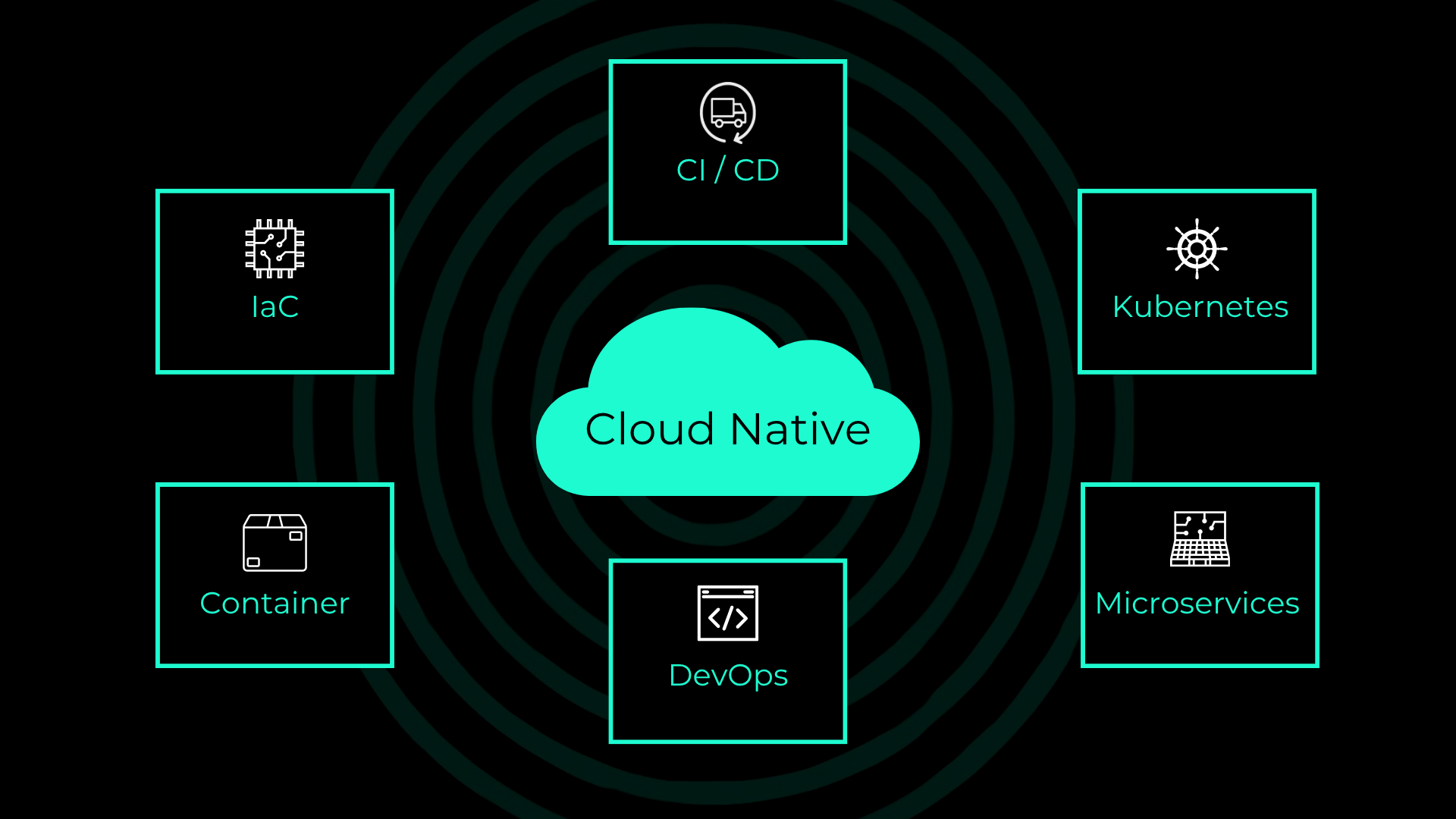
Typical characteristics of a cloud-native architecture include:
- Microservices Instead of Large Monolithic Applications
- Containerization of applications and dependencies
- Orchestration, for example with Kubernetes
- Automation of builds, deployments, and infrastructure
- Infrastructure as Code (IaC)
- Continuous Integration and Continuous Delivery (CI/CD)
- Observability and automated monitoring
- Elastic scaling
- Fault-Tolerant and Resilient Architectures
The goal is to be able to develop, deploy, and operate software more quickly and reliably.
An important point: “Cloud-native” does not necessarily mean that an application must be run with a public cloud provider. These principles can also be applied in private clouds, on-premises environments, or hybrid infrastructures.
The NWS Newsletter
New products, fresh features and dates for events and talks: everything important from the NWS world, delivered compactly to your inbox.
Why is cloud-native gaining importance?
Modern applications often have to cope with highly fluctuating demands. For example, an online store might have to process a manageable number of requests on a typical Tuesday, while promotions or seasonal events can suddenly generate many times the normal traffic.
However, traditional infrastructure is usually designed to meet a specific capacity requirement. This can result in a shortage of resources during peak times or in resources remaining unused outside of those times.
Cloud-native architectures, on the other hand, rely on dynamic resource provisioning, automation, and horizontal scaling.
Development itself is also changing. Applications are continuously being expanded, and new features must be deployed to production as quickly as possible. Large monolithic applications can be problematic in this context, as even small changes can require extensive testing and deployments.
Cloud Native takes a different approach: applications are broken down into smaller components that are as independent of one another as possible and operated automatically.
This enables companies to pursue the following goals, among others:
- Faster releases
- Better scalability
- Higher availability
- More efficient use of resources
- Faster troubleshooting
- more automation
- Better collaboration between development and operations
The Pillars of Cloud-Native Applications
At the heart of modern cloud-native applications are various key technologies.
Microservices
In a monolithic application, many functions and components are contained within a single application. This can be useful for smaller projects. However, as complexity increases, challenges arise.
For example, a change to one component can affect other parts of the application. Scaling and deployment are also often performed for the entire application.
Microservices take a different approach.
An application is divided into smaller, as independent as possible, services. Each service performs a clearly defined task.
An online retailer, for example, might consist of the following services:
- User Management
- Product Catalog
- Shopping Cart
- Order Management
- Payment Processing
- Shipping
Each of these areas can be implemented and operated as a separate service.
What are the advantages of microservices?
Independent Development
Teams can continue to develop individual services independently of one another. This allows development processes to be carried out in parallel. For example, one team can work on the payment service while another team expands the product catalog.
Independent Deployments
Changes do not necessarily have to affect the entire application. If, for example, only the notification service is modified, it can be tested and rolled out separately. This can significantly increase the release speed.
Targeted Scaling
Not every part of an application requires the same resources. If the product catalog receives a particularly high volume of requests, this service can be scaled specifically to meet that demand. This is more efficient than having to scale the entire application up.
Technological flexibility
Microservices can use different technologies, depending on the requirements. For example, one service might be developed in Go, while another might use Python or Java. However, this flexibility can also introduce additional complexity. Therefore, microservices should not be used as an end in themselves.
Containers
Containers are a central component of many cloud-native architectures. A container bundles an application along with its necessary dependencies and provides a standardized runtime environment. This allows applications to run consistently, regardless of the underlying infrastructure.
The basic idea is that the application should be deployed along with its required environment in a way that is as reproducible as possible. This helps reduce issues such as “It works on my computer.” This is because the development, testing, and production environments can be built on the same container images or compatible runtime conditions.
What are the benefits of containerization?
Consistent Environments
Containers create a standardized environment for applications. This helps reduce differences between development, testing, and production environments.
Rapid Deployment
Containers generally start up much faster than full virtual machines because they do not each require their own complete operating system. This is particularly useful for dynamic applications and automated scaling.
Better Insulation
Applications and their dependencies can be run in isolation from one another. Among other things, this makes it easier to manage different versions of libraries and runtime environments.
Portability
Containers can run on different infrastructures, provided a compatible container runtime environment is available.
This makes them suitable, for example, for:
- Local development environments
- Data centers
- Private clouds
- Public clouds
This portability can help companies reduce their dependence on a specific infrastructure.
Info
It is a common misconception that simply containerizing an application makes it “cloud-native.” While containerization is an important building block, it is only one part of the overall approach. For example, someone who has to manually manage 50 containers has certainly implemented containers, but has not yet created a truly automated platform. As the number of containers increases, orchestration platforms therefore become essential.
Kubernetes: Automated Container Orchestration
Kubernetes is one of the most popular projects in the cloud-native space. Among other things, the platform handles tasks related to the deployment, scaling, and management of containerized workloads. Instead of manually starting individual containers, you can define the desired states. For example: “Five instances of a specific service should run at all times.” If an instance fails, Kubernetes automatically ensures that a replacement instance is provisioned. As the load increases, additional instances can be launched, provided the application and the platform are configured accordingly.
An important feature of modern cloud-native platforms is the ability to respond to errors automatically (self-healing and automatic recovery). Suppose a container or pod of a service fails. In a fully manual environment, an administrator would have to detect the failure and restart the application. In a Kubernetes environment, the platform can monitor the desired state and attempt to restore it automatically. This process is often referred to as self-healing. As a result, operations shift from a reactive model to a more automated one.
Automation
Automation is one of the most important aspects of a cloud-native architecture. This is because modern platforms generate a large number of recurring tasks.
- Build Code
- Run tests
- Create container images
- Check images
- Deploy applications
- Provision infrastructure
- Manage configurations
- Scaling resources
- Perform backups
- Configure monitoring and alerts
Performing these tasks manually is not only time-consuming but also increases the likelihood of human error. Cloud Native therefore relies as heavily as possible on automated processes.
CI/CD
Continuous Integration and Continuous Delivery (or Continuous Deployment, CI/CD) play a central role. A typical automated process might look like this, for example:
Code change → Build → Tests → Security checks → Container image → Deployment → Monitoring
A developer pushes a change to a Git repository. This automatically triggers a pipeline:
- The application is being built.
- Automated tests are being run.
- Security checks are being performed.
- A container image is created.
- The image is pushed to a registry.
- The application is deployed to a test environment.
- Further tests are running.
- Afterward, deployment to production can take place.
Depending on the strategy, the deployment can be fully automated or supplemented with a manual approval step.
Infrastructure as Code
Another key component of cloud-native architecture is Infrastructure as Code (IaC). Instead of manually configuring servers, networks, or other infrastructure components via graphical interfaces, the desired infrastructure is described as code or in the form of a declarative configuration.
Examples of well-known tools include:
- Terraform
- OpenTofu
- Ansible
- Kubernetes manifests
This makes infrastructure reproducible. For example, a company can specify which resources are required for an application. This definition can be versioned, tested, and rolled out automatically.
Among other things, this offers the following advantages:
- reproducible infrastructure
- fewer manual errors
- Traceable changes
- Simpler recovery
- Automated deployment
- Better collaboration between teams
DevOps
The concepts of “cloud-native” and “DevOps” are not identical, but they complement each other very well. While “cloud-native” primarily deals with architectural and platform principles, “DevOps” focuses on collaboration, processes, and responsibilities between the development and operations teams.
Traditionally, development and operations were often viewed as separate functions. Developers built software. Administrators managed the systems. In cloud-native environments, it often works better when both areas collaborate more closely. For example, developers need to understand how their application is operated. Operations teams, in turn, benefit when applications are deployed in a standardized and automated manner.
This results in a shared lifecycle:
Develop → Build → Test → Deploy → Operate → Monitor → Improve
Automation is the connecting element here.
Benefits of Cloud Native
Cloud Native Enables Faster Software Releases
One of the biggest advantages of a cloud-native approach is speed. Traditional development processes can involve extensive manual steps. Days or weeks can pass between making a change to the code and releasing the new version. Automated CI/CD processes can significantly shorten this timeframe. This allows small changes to be released more frequently and in a more controlled manner. This has an important side effect: The smaller a change is, the easier it’s usually to trace what caused a potential issue. Instead of rolling out one major release per quarter, for example, companies can release many smaller changes. This approach is often referred to as Continuous Delivery or, in the case of fully automated production deployments, as Continuous Deployment.
Scalability: Allocating resources where they’re needed
Modern software doesn’t always have to be utilized at the same level. A streaming service, an online store, or a SaaS provider, for example, can have a highly variable load profile. Cloud-native architectures enable more flexible scaling. A distinction is made between vertical and horizontal scaling.
Vertical scaling: An existing instance is allocated more resources. Example: more CPU, more RAM, more storage space
Horizontal scaling: Additional instances of an application are launched. Horizontal scaling is particularly beneficial for cloud-native applications. Example: An application typically runs with five instances. During a peak load, ten or twenty instances are automatically required. Once the peak load has subsided, the number can be reduced again. This allows resources to be dynamically adjusted to actual demand.
Greater Resilience and Availability
Cloud-native architectures can be designed so that the failure of individual components does not lead to the unavailability of the entire application. This is particularly important for distributed applications. For example, a service can be distributed across multiple instances. If one instance fails, other instances remain available.
Additional mechanisms can further increase resilience:
- Health Checks
- Automatic Restarts
- Load Balancing
- Replication
- Failover
- Multi-zone architectures
- Backup and recovery strategies
However, it’s important to note that cloud-native does not automatically guarantee high availability. The architecture must be designed and operated accordingly.
Better resource utilization and efficiency
Another advantage is the more efficient use of infrastructure. In traditional systems, resources are often sized based on expected peak demand. This can result in capacities not being fully utilized for much of the time. Cloud-native platforms enable more dynamic resource management. Automated scaling, for example, only provides additional capacity when it is needed. At the same time, resource limits and requests can help distribute workloads more predictably across a platform. This makes cloud-native solutions attractive for cost optimization as well. However, cloud-native does not automatically mean lower costs. A poorly configured cloud-native platform can even lead to significant costs. That is why monitoring, FinOps, and thoughtful resource planning are important complementary measures.
Observability: Understanding Applications Better
The more distributed an application is, the more difficult it becomes to analyze errors based solely on individual server logs.
For example, a request can pass through multiple microservices:
Client → API Gateway → Service A → Service B → Database
If the request fails, it must be possible to trace where the problem originated. This is where observability comes into play.
There are three key pillars: Metrics provide numerical information about systems. Logs document events within the application and infrastructure. Distributed tracing shows the path a request takes through multiple services.
Together, this information enables significantly better analysis of complex cloud-native systems.
Security can be more deeply integrated into the development process
Cloud-native environments are also changing the approach to IT security. Security should not be addressed only after development is complete, but should be integrated into the process as early as possible. This approach is often referred to as “Shift Left Security.”
Automated pipelines can, for example, check the following:
- Dependencies on Known Vulnerabilities
- Container images
- Configurations
- Infrastructure as Code
- Secrets
- Compliance requirements
In addition, Kubernetes environments can be secured using the following concepts, such as Role-Based Access Control (RBAC), network policies, secrets management, image scanning, pod security, the principle of least privilege, and encryption. This makes security an integral part of the entire software lifecycle.
Achieving Faster Innovation and Shorter Time-to-Market
For companies, speed is not just a technical issue. Those who can develop and deploy new features faster can also respond more quickly to customer demands and market changes. Cloud-native principles can help accelerate development and operations processes. For example, a new feature can be developed as part of a single microservice. It is then tested and deployed via an automated pipeline.
This allows companies to:
- Experiment faster
- Test features sooner
- Gather feedback faster
- Release more frequently
- Continuously improve products
Cloud Native not only supports the IT department but can also have a direct impact on a company’s competitiveness.
Cloud Native reduces reliance on manual processes
Manual processes are often difficult to reproduce. For example, an administrator makes changes directly to a system. Months later, it’s often no longer clear why a particular configuration exists. With Infrastructure as Code and automated deployment processes, however, changes are versioned and documented. This creates a kind of single source of truth for infrastructure and deployment.
In the Git repository, for example, you can track:
- When a change was made.
- Who made it.
- Which configuration was changed.
- What the previous state was.
- How the change can be rolled back.
This improves transparency and traceability.
Rollbacks become easier
Automated deployments also open up better options for rollbacks. Suppose a new version of a service causes unexpected problems after deployment. If previous versions can be properly versioned and deployed automatically, it’s possible to switch back to a working version relatively quickly.
Strategies such as the following go even further:
Blue-Green Deployment: Two environments exist in parallel. Traffic is controlled and redirected from the old version to the new one.
Canary Deployment: The new version is initially deployed to only a small portion of users.
Rolling Update: The old instances are gradually replaced by new ones.
These methods can reduce the risk associated with releases.
The Key Benefits at a Glance
The key benefits of a cloud-native approach can be summarized as follows:
| Advantages | Meaning |
| Scalability | Applications can be dynamically adjusted to meet demand. |
| Flexibility | Services can be developed and operated independently of one another. |
| Automation | Recurring tasks are standardized and automated. |
| Faster releases | CI/CD enables more frequent and smaller deployments. |
| Resilience | Failures of individual components can be better mitigated. |
| Portability | Containers enable operation in a variety of environments. |
| Transparency | Infrastructure as Code and observability improve traceability. |
| Efficiency | Resources can be allocated more dynamically. |
| Innovation | New features can be developed and tested more quickly. |
| Standardization | Platforms such as Kubernetes create standardized operating models. |
Cloud-Native vs. Traditional Software Architecture
The differences become particularly clear when you compare the two approaches.
| Traditional Approach | Cloud-Native Approach |
| Often monolithic applications | Microservices and Modular Architectures |
| Manual Deployments | Automated CI/CD Pipelines |
| Focus on Physical or Virtual Servers | Containers and Platforms |
| Static Resource Allocation | Dynamic Scaling |
| Manual Configuration | Infrastructure as Code |
| Troubleshooting Is Often Reactive | Automated Monitoring and Self-Healing |
| Major Releases | Small, Frequent Releases |
| Infrastructure as a Separate Topic | Infrastructure as Part of the Development Process |
| Monitoring Individual Systems | Holistic Observability |
| Manual processes | Automated Workflows |
However, this table should not be interpreted to mean that “cloud-native is always better.” For smaller applications that change infrequently, a traditional architecture may well be the better choice. The specific use case is always the deciding factor.
What challenges does cloud-native bring?
As many advantages as the cloud-native approach offers, it also presents challenges.
Greater Complexity
An application consisting of 30 microservices is significantly more complex to operate than a monolithic application. Networking, monitoring, security, and deployment must be taken into account accordingly.
New technologies
Teams may need to familiarize themselves with technologies such as Kubernetes, containerization, Helm, GitOps, Infrastructure as Code, and observability. This requires expertise and appropriate training.
Higher Initial Effort
Setting up an automated cloud-native platform initially requires time and resources. CI/CD pipelines, monitoring, security, and infrastructure automation must be set up. The long-term benefits are particularly evident when operating a large number of deployments, services, and workloads.
Distributed system issues
Microservices introduce new types of errors, such as network errors, timeouts, inconsistent data, service outages, or complex dependencies. Therefore, applications must be developed and tested accordingly.
Cost Control
More containers, more clusters, and more infrastructure do not automatically mean lower costs. Without proper governance and monitoring, cloud-native environments can consume an unnecessary amount of resources.
When Is a Cloud-Native Approach Worth It?
Not every application needs to become fully cloud-native right away. This approach is particularly appealing for companies that:
- Continuously develop applications
- must be able to handle highly fluctuating workloads
- Aim for short release cycles
- Operate many services or applications
- Want to automate development and deployment processes
- Have high availability requirements
- operate hybrid or multi-cloud environments
- want to establish modern DevOps processes.
A cloud-native architecture can also be particularly attractive for SaaS providers. For example, it makes it possible to develop a platform whose components can be scaled and further developed independently of one another.
How do you get started with cloud-native?
A cloud-native transformation process doesn’t necessarily have to start with a complete reimplementation. A sensible approach is to proceed step by step.
Step 1: Analyze existing applications
Which applications are currently in use? Which of these require frequent adjustments? Where are there scaling or performance issues? Which systems are particularly business-critical?
Step 2: Assess cloud readiness
Technical, organizational, and cultural factors should be considered together. Not every application is equally suitable for migration or modernization.
Step 3: Select a suitable use case
Instead of changing the entire IT landscape immediately, a limited project can serve as a pilot. This allows you to gain initial experience with containers, CI/CD, and automation.
Step 4: Implement containerization
Applications can be containerized in stages. During this process, it’s also important to verify whether the application itself is suitable for a containerized environment.
Step 5: Implement automation
CI/CD and Infrastructure as Code can be introduced in phases. The goal should be to reduce recurring manual tasks as much as possible.
Step 6: Implement Orchestration
As the number of containers increases, a platform like Kubernetes may become useful.
Step 7: Integrate observability and security
Monitoring, logging, tracing, and security should be considered early on in the project.
Step 8: Continuously Optimize
Cloud-native is not a one-time migration project. Architecture, processes, and the platform should therefore be regularly reviewed and refined.
Conclusion: Cloud-native lays the foundation for modern software development
A cloud-native approach can make software projects significantly more flexible, automated, and scalable. Microservices enable a modular architecture and the independent development of individual components. Containers provide reproducible and portable runtime environments. Automation bridges the gap between development and operations and reduces manual processes. With technologies such as Kubernetes, CI/CD, Infrastructure as Code, and observability, this creates a modern platform for the development and operation of digital applications. The key point, however, is this: Not every application requires microservices, Kubernetes, or a highly distributed architecture. It comes down to applying the right principles for the specific requirements. For modern software projects, cloud-native approaches can provide an important foundation for responding more quickly to changes, scaling applications as needed, and automating operations. Those who implement cloud-native correctly therefore not only modernize their infrastructure but can also streamline the entire software lifecycle—from development through deployment to operations—more efficiently.


0 Comments