Managed Icinga–
-Monitoring from Germany
Your Pre-Built Open Source Monitoring Stack
Prices
Features
| wdt_ID | wdt_created_by | wdt_created_at | wdt_last_edited_by | wdt_last_edited_at | Feature | Master Basic | Master Advanced | Master Premium | Satellite Basic | Satellite Advanced | Satellite Premium |
|---|---|---|---|---|---|---|---|---|---|---|---|
| 2 | Hosts | 10 | 25 | 200 | 5 | 25 | 50 | ||||
| 3 | Service Checks | 30 | 75 | 150 | 15 | 50 | 100 | ||||
| 4 | Icinga2 Web Nutzer | 1 | 5 | 10 | 0 | 0 | 0 | ||||
| 5 | Grafana Dashboards | ✓ | ✓ | ✓ | X | X | X | ||||
| 6 | nkustos | 15/07/2025 06:21 AM | nkustos | 15/07/2025 06:21 AM | SMS | 25 | 50 | 100 | 15 | 25 | 50 |
| 7 | Icinga Director | ✓ | ✓ | ✓ | X | X | X | ||||
| 8 | Icinga2 API Access | ✓ | ✓ | ✓ | ✓ | ✓ | ✓ | ||||
| 9 | Director API Access | ✓ | ✓ | ✓ | X | X | X | ||||
| 10 | Own CA Supported | ✓ | ✓ | ✓ | ✓ | ✓ | ✓ |
Managed Icinga Setup
Updates. Operation. We take care of it!
This allows you to reliably monitor servers, networks, and services without having to set up and maintain the monitoring system yourself.
We take care of:
- Setup
- Configuration
- Backups
- Monitoring
- Updates
Your advantages

Test free of charge

A full set of tools on board

Reliable Alerts

Integratable

Preconfigured and ready to go
Enterprise-level infrastructure
Every GitLab instance at NWS runs on the same robust foundation

3-fold replicated

Hosted in Germany

Security and data protection

Modern Kubernetes platform
Your advantage
Even in the event of a hardware failure, your data remains available at all times: no data loss, no downtime.
Your advantage
Full GDPR compliance without effort. Ideal for industries with high data protection requirements.
Your advantage
You can score points with customers and partners with certified security without having to audit yourself.
Your advantage
Kubernetes can use self-healing to quickly restart a “broken” instance and thus ensure greater availability.
Managed Icinga Interface
Here’s how to keep track of the status of your infrastructure
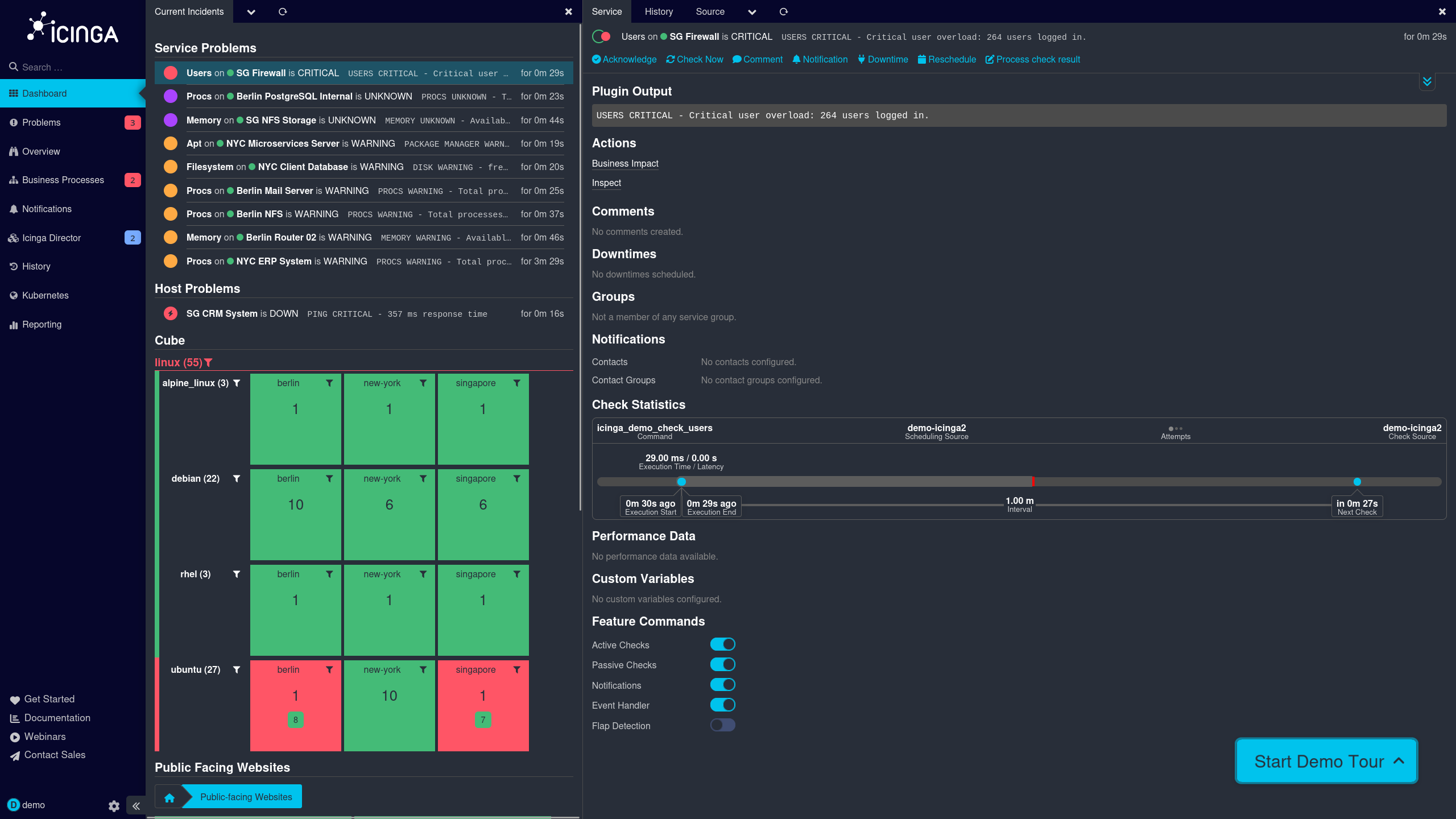
Use the sidebar to navigate directly to issues, overviews, business processes, and the configuration in Icinga Director.
Use colors and status messages to immediately identify which services are critical, under warning, or unknown, along with the duration of the issue.
Keep track of down hosts as well, including response time and downtime.
Visualize the status of your systems, grouped by operating system and location, in a compact overview.
Take action directly from the detail view, acknowledge issues, schedule downtime, or manually trigger checks.
Read the exact status message for the check and immediately understand what caused the problem.
Track the execution time, interval, and next scheduled check for each service.
Control which features are active for each service, such as active checks, notifications, or flap detection.
Typical use cases
Monitoring of servers, networks & services
Monitor your entire IT landscape in one place—from individual servers to networks to individual services. With the preconfigured Icinga stack, you can easily add new hosts using an agent script and view their status directly in Icinga Web 2. This way, you can always see at a glance whether everything is running smoothly.
Visualization of metrics, logs and events
Turn raw data into clear, easy-to-understand reports. The included Grafana dashboards let you view metrics, logs, and events at a glance and identify correlations more quickly. This simplifies both day-to-day monitoring and root cause analysis in the event of a failure.
Alerting in the event of faults & problems
Find out immediately when something is wrong—not hours later. Icinga reliably notifies you of disruptions and issues, including via text message with a set quota depending on your plan. This allows you to take action before a minor anomaly turns into a major outage.
Integration into existing Icinga installations
Integrate our managed solution into your existing environment instead of starting from scratch. Using a satellite, you can expand your existing master to include additional domains or locations, and thanks to support for your own CA, you can retain your existing certificate structures.
Our customers
Our solutions are in use – and with measurable success. Take a look at how other companies benefit from our services.


Awards


Next steps