Managed Nextcloud
Hosting in Germany

Secure data storage & collaboration

Prices

All prices are subject to statutory value added tax
Are you looking for an individual, customized solution from Managed Nextcloud?

Features

wdt_ID Feature Basic Advanced Premium
14 Storage Space 50GB 1TB 2TB
15 NextCloud Office
20 Nextcloud Talk High Performance Backend High Performance Backend
21 NextCloud Marketplace
Show more

Managed Nextcloud Setup

Updates. Operation. We take care of it!

Managed Nextcloud is your secure, GDPR-compliant platform for file storage and collaboration, hosted in Germany.
You can store and share files, collaborate on documents with your team, and communicate via Nextcloud Talk. Your data remains under your control.
We take care of:
  • Setup
  • Configuration
  • Backups
  • Monitoring
  • Updates

Your advantages

Test free of charge Icon

Test free of charge

Test 30 days free of charge – without restrictions.
Managed & easy to maintain

Everything in one place

File storage, collaborative document editing, and communication via Nextcloud Talk—all on one platform.
Flexibility

No artificial user limits

Scale your team without hidden costs. Our plans are measured by memory.
Icons Support

Support service

Personal, flexible and directly accessible.
Managed & easy to maintain

A Self-Managed M365 Alternative

You get the features of a modern collaboration suite without having to give your data to a hyperscaler.
Flexibility

Flexible Access

Access via the web, desktop, mobile, or WebDAV, supplemented by granular file access control.

Enterprise-level infrastructure

Every Nextcloud instance at NWS runs on the same robust foundation

3-fold replicated

3-fold replicated

Your data is replicated three times for maximum reliability.
Icon data centers in Germany

Hosted in Germany

Your data is securely hosted in our data centers in Germany.
Security and data protection icon

Security and data protection

We are ISO 27001-certified and GDPR-compliant.
Kubernetes platform

Modern Kubernetes platform

Operated on our certified Kubernetes infrastructure.

Your advantage

Even in the event of a hardware failure, your data remains available at all times: no data loss, no downtime.

Your advantage

Full GDPR compliance without effort. Ideal for industries with high data protection requirements.

Your advantage

You can score points with customers and partners with certified security without having to audit yourself.

Your advantage

Kubernetes can use self-healing to quickly restart a “broken” instance and thus ensure greater availability.

Managed Nextcloud Interface

You can organize your files, communications, and appointments in a clean, uncluttered interface
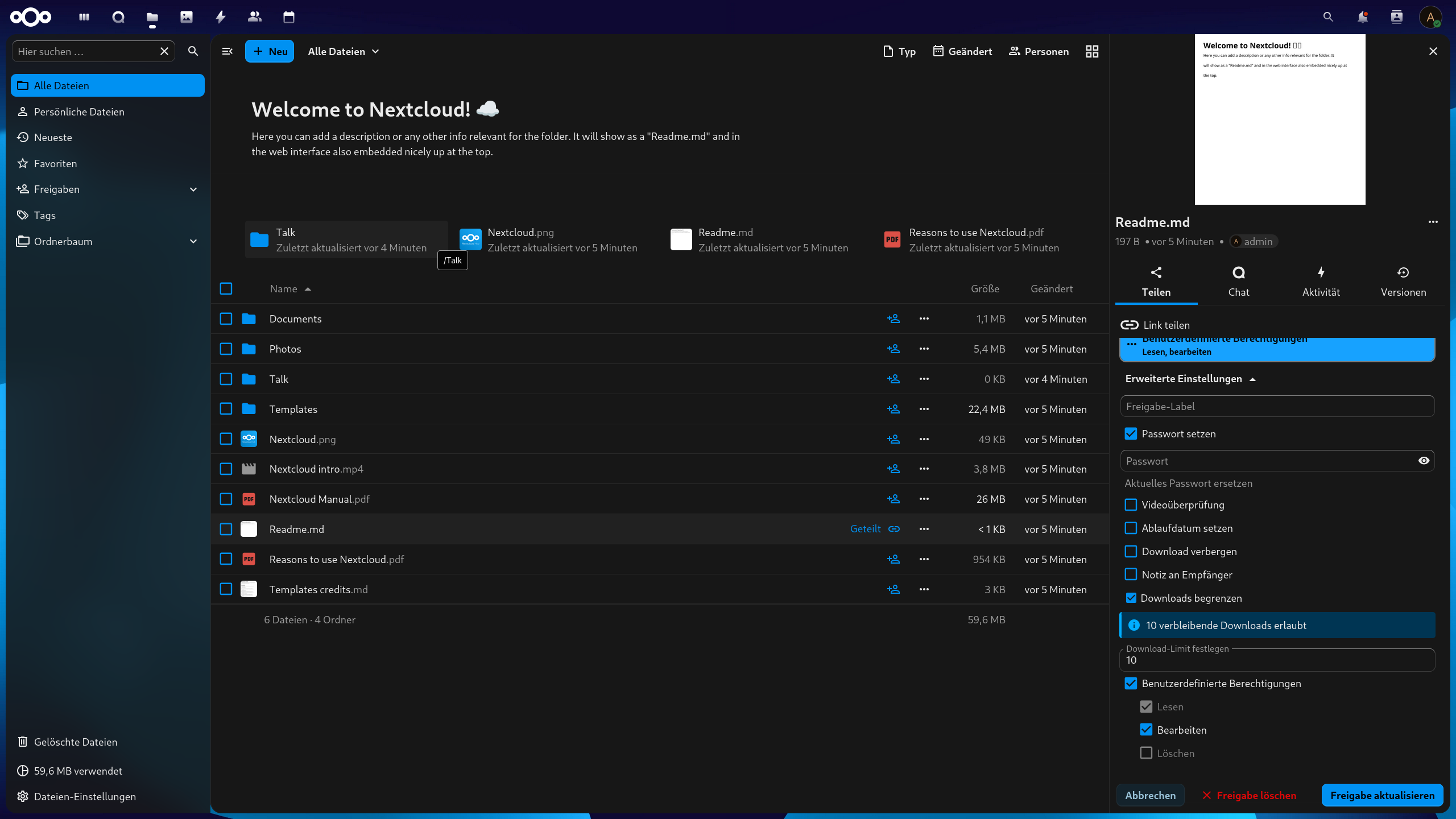
A look at the Managed Nextcloud interface. Here's everything you can do.
p

Use the sidebar to navigate to shared items, favorites, tags, and deleted files.

Use the top bar to switch between Files, Photos, Chat, Calendar, and Contacts with a single click.

b

Manage all your files and folders in one place using a clean, organized interface.

~

Share files via a link and protect them with a password, expiration date, or download limit.

Grant granular permissions for reading, editing, and deleting.

P

Use “New” to create files, folders, or documents in seconds.

Keep track of your used storage space at all times.

p

Keep an eye on your notifications so you’re always up to date.

Typical use cases

Secure file storage and data transfer

Store and share your files in a secure location that’s GDPR-compliant and hosted in Germany. Depending on your plan, you’ll have 50 GB to 2 TB of storage available, and your data is backed up daily. This way, you can share even sensitive documents without giving up control over them.

Collaboration in a team or with external parties

Collaborate on documents, share folders, and coordinate directly within the platform. With Nextcloud Office, you can edit files together in real time; starting with the Advanced plan, Nextcloud Talk is included for chat and meetings. You can also integrate external partners in a targeted and controlled manner.

Digital workplace solution for companies

Combine files, collaboration, and communication in a single digital workspace for your business. User management, groups, and granular file access controls provide the structure and security you need. We handle operations, updates, and backups, so your team can get started right away.

Self-Hosted Alternative to Microsoft 365

Get the features of a modern collaboration suite without handing your data over to a hyperscaler. Managed Nextcloud is your self-managed alternative to Microsoft 365 and Google Workspace, with Office, Talk, and file storage all in one place. Your data stays in Germany and under your control.

Our customers

Our solutions are in use – and with measurable success. Take a look at how other companies benefit from our services.

Awards

NWS Certificate ISO IEC 27001
NWS Certificate OpenInfra Foundation Silver Member
NWS Certificate Kubernetes Certified Service Provider
NWS Certificate CNCF Silver Member
Readers' Choice Service Provider Award 2025 - Kubernetes

FAQ

2
3

Is Nextcloud an alternative to Microsoft 365 or Google Workspace?

Yes. Managed Nextcloud is a self-managed, self-hosted alternative to Microsoft 365 and Google Workspace. With Nextcloud Office, you can collaborate on documents with your team; with Nextcloud Talk, you can communicate directly within the platform; and your data stays in Germany and under your control.
2
3

Are Nextcloud Office and Talk included?

Nextcloud Office and the Nextcloud Marketplace are included in all plans. Nextcloud Talk with a high-performance backend is included starting with the Advanced plan, so you can reliably host even larger meetings and chats.
2
3

How do I create users and groups?

Log in as an administrator, click your username in the top-right corner, and select "Users. " To create a group, click "+ Add Group" in the left column and enter a name. To add a new user, enter their username and password at the top, select the appropriate group, and click “Create.”

2
3

How do I upload files and create folders?

Files are uploaded via the web interface using the File app. There is a button with a "+" symbol above the list of your files. Click on it and select Upload. Then select the files you want to open and click on "Open". To create a folder, click on the button with the "+" symbol again and select Folder. Now enter the desired folder name and press Enter.

2
3

Why does the upload time sometimes get stuck at one second?

That's because your data is being uploaded to S3 storage in the background. Depending on the amount of data, this may take a while. Nextcloud itself can't calculate exactly how long the process will take, but your files will be transferred completely and securely.
2
3

How do I access Nextcloud via WebDAV?

To connect to your Nextcloud server via WebDAV, you may need a WebDAV client for your PC/Mac. Many operating systems already have WebDAV capability built in. Nevertheless, you can use your favorite online search engine to find a suitable WebDAV solution for your system. To connect via WebDAV, you need the WebDAV link of your Nextcloud server. Open the Files application in the Nextcloud web interface and select Settings at the bottom left. Copy the link shown below and change https:// to davs:// if it does not work immediately. When prompted, enter your username and password.
2
3

Are my files backed up?

Yes. Your data is backed up daily. We create a snapshot of the system and also a backup of the volume, so your files are protected twice over.
2
3

How do I update Nextcloud?

We'll handle the update and upgrade process for you as soon as we've tested the new Nextcloud version. We'll notify you of update windows via email. Your server will then be updated during a brief reboot, which usually takes only a few minutes.
2
3

Who can I contact if I have problems?

You can get help at any time by emailing nws@netways.de. For general questions about settings, we also recommend the Nextcloud forum and the Nextcloud documentation.
2
3

How can I cancel my Nextcloud app?

You can easily cancel your contract in the contract overview under Manage Contract.