
Managed GitLab–
-Hosting in Germany
Your DevSecOps platform for development and projects
Prices
Basic CE
- Storage space: 50 GB
- GitLab Runner 1 (4 jobs)
- Can be canceled monthly
- Start now
Advanced CE
- Storage space: 200 GB
- GitLab Runner 1 (4 jobs)
- Can be canceled monthly
- Start now
Premium CE
- Storage space: 500 GB
- GitLab Runner 2 (8 jobs)
- Can be canceled monthly
- Start now
All prices are exclusive of statutory VAT
Features
| wdt_ID | wdt_created_by | wdt_created_at | wdt_last_edited_by | wdt_last_edited_at | Feature | CE Basic | CE Advanced | CE Premium | EE Basic | EE Advanced | EE Premium |
|---|---|---|---|---|---|---|---|---|---|---|---|
| 2 | Storage Space | 50GB | 200GB | 500GB | 50GB | 200GB | 500GB | ||||
| 3 | GitLab Runner | 1x (2 vCPU / 2 GB RAM / 15 Disk) | 1x (4 vCPU / 4 GB RAM / 25 Disk) | 2x (8 vCPU / 8 GB RAM / 50 Disk) | 1x (2 vCPU / 2 GB RAM / 15 Disk) | 1x (4 vCPU / 4 GB RAM / 25 Disk) | 2x (8 vCPU / 8 GB RAM / 50 Disk) | ||||
| 4 | CPU | Shared | Shared | Shared | Shared | Shared | Shared | ||||
| 5 | RAM | 4GB | 6GB | 12GB | 6GB | 8GB | 16GB | ||||
| 6 | nkustos | 15/07/2025 06:21 AM | nkustos | 18/07/2025 05:09 AM | Custom Runner Flavor possible | X | ✓ | ✓ | X | ✓ | ✓ |
| 7 | GitLab Registry | ✓ | ✓ | ✓ | ✓ | ✓ | ✓ | ||||
| 8 | CI/CD Pipelines | ✓ | ✓ | ✓ | ✓ | ✓ | ✓ | ||||
| 9 | GitLab-EE Lizenz benötigt | - | - | - | ✓ | ✓ | ✓ |
Managed GitLab Setup
Updates. Operation. We take care of it!
You’ll get a GitLab instance that’s ready to use right away. Take advantage of the full range of features without spending time on maintenance or scaling.
We take care of:
- Setup
- Configuration
- Backups
- Monitoring
- Updates
Your advantages

Test free of charge

Ready to go right away

CI/CD from the Start

Support service

CE / EE Selection
Enterprise-level infrastructure
Every GitLab instance at NWS runs on the same robust foundation

3-fold replicated

Hosted in Germany

Security and data protection

Modern Kubernetes platform
Your advantage
Even in the event of a hardware failure, your data remains available at all times: no data loss, no downtime.
Your advantage
Full GDPR compliance without effort. Ideal for industries with high data protection requirements.
Your advantage
You can score points with customers and partners with certified security without having to audit yourself.
Your advantage
Kubernetes can use self-healing to quickly restart a “broken” instance and thus ensure greater availability.
Managed GitLab Interface
Keep track of projects, reviews, and tasks all in one place
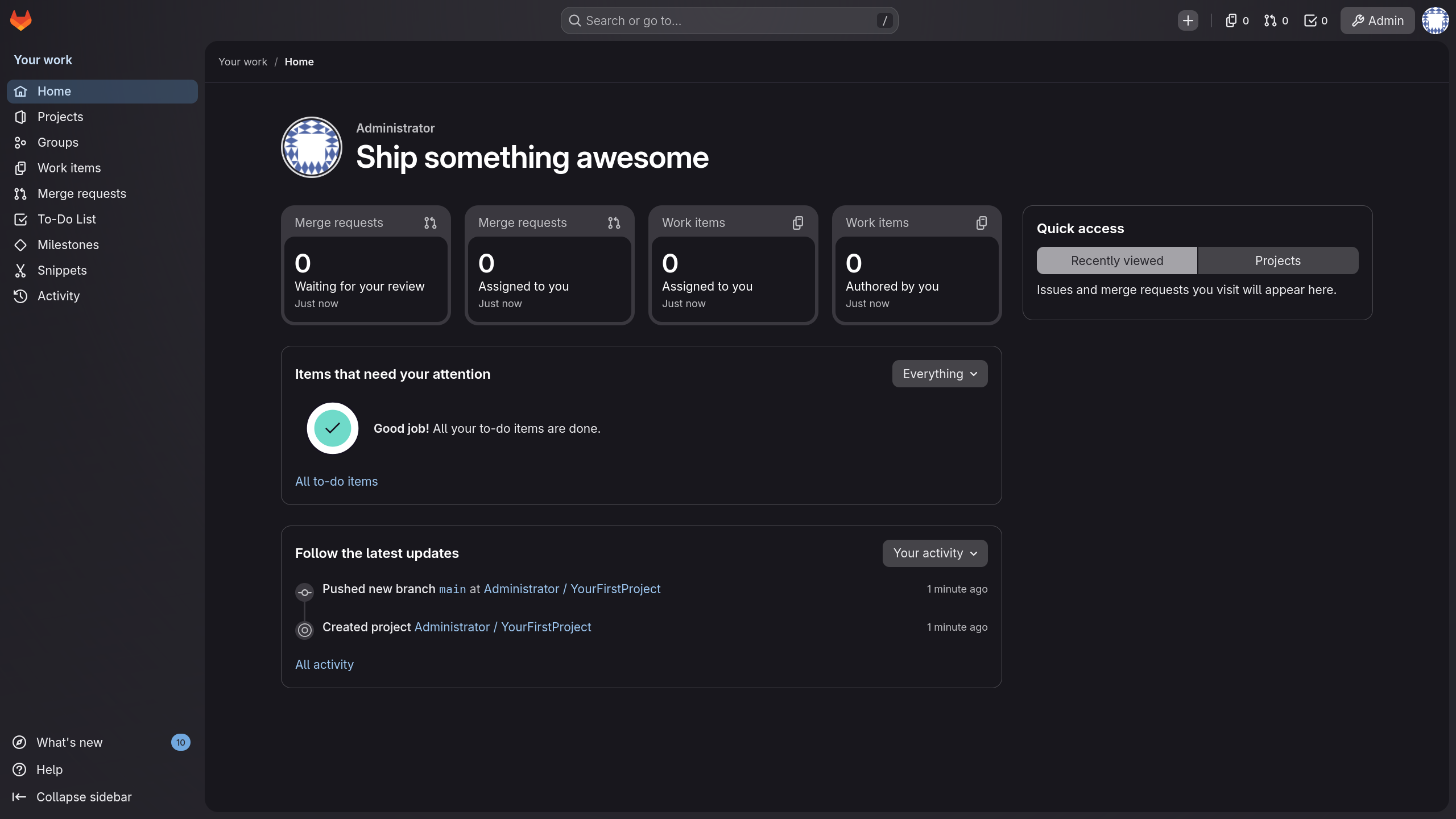
Use the sidebar to navigate directly to projects, merge requests, and tasks.
See at a glance which merge requests and work items are currently waiting for you.
Create new projects, issues, or merge requests with a single click.
Use the search function to jump directly to any project, issue, or code snippet.
Manage users, permissions, and settings centrally through the admin panel.
Keep track of your open to-dos and reviews all in one place.
Use the activity feed to see who made what changes to the project and when.
Use individual accounts for granular access control.
Typical use cases
DevOps automation (CI/CD)
Build, test, and deploy your code automatically without setting up your own pipeline infrastructure. With the included GitLab Runners and CI/CD pipelines, your builds run directly in your managed instance—and starting with the Advanced tier, you can even use a custom runner flavor. This helps you shorten your release cycles and maintain consistently high quality.
Cloud-native development with Kubernetes
Develop and run containerized applications from the very first line of code through to deployment. GitLab integrates closely with Kubernetes, and when combined with our Managed Kubernetes, you get a seamless, end-to-end environment from a single provider, hosted entirely in Germany. This makes deployments traceable, repeatable, and easily scalable.
Security analyses & compliance management
Embed security firmly into your development process instead of adding it as an afterthought. As a DevSecOps platform, GitLab helps you identify vulnerabilities early and document approvals in a traceable manner. The fact that your instance runs in Germany in compliance with the GDPR and is ISO 27001-certified also helps you with audits and compliance verification.
Agile project planning & roadmap tracking
Plan tasks, track progress, and keep an eye on your roadmap—all in the same place as your code. With boards, issues, and milestones, development, product, and related teams can work from a common foundation. This reduces friction and makes a project’s status transparent to everyone.
Management of large source code repositories with distributed teams
Keep even large codebases and numerous concurrent contributions neatly organized. With ample storage, GitLab Registry, and a centralized instance, distributed teams can collaborate reliably, no matter where they are. We handle backups and operations in the background.
Our customers
Our solutions are in use – and with measurable success. Take a look at how other companies benefit from our services.


Awards


Next steps


Test GitLab now for 30 days free of charge and get started right away.
FAQ
For which target group is GitLab suitable?
What is the difference between CE and EE?
What does GitLab include, and how do backups work?
Can I use Runner and CI/CD pipelines?
How do updates work?
Where can I find my login details?
Can I migrate my existing GitLab instance to you?
Who can I contact if I have problems or questions?
You can get help with your instance at any time at nws@netways.de. For general questions about the settings, we also recommend checking out the GitLab forum and documentation.