

Retrieval-Augmented Generation
Welcome to this tutorial on Retrieval Augmented Generation (RAG).
If you’re wondering what RAG is, why this technique can be so useful and how to configure it in your Open-WebUI, you’ve come to the right place.
What exactly is RAG and how does it work?
Retrieval Augmented Generation (RAG) is one of the most important techniques in recent years for making large language models (LLMs) significantly more reliable without the need to constantly retrain or fine-tune the model.
The basic process of RAG is as follows:
First, existing texts, for example PDFs or other documents, are divided into smaller sections (so-called chunks) using a content extraction engine such as Apache Tika, which extracts content from formats such as PDF, Word or HTML and prepares it for further processing as text.
These text sections are then converted into numerical vectors that represent the semantic meaning of the content using an embedding model.
The generated embeddings are then saved in a vector database.
If a user now asks a question, this query is also converted into an embedding. A retrieval mechanism then searches the vector database for the most similar entries in terms of content and selects the most relevant text sections (often referred to as *top-k chunks*).
The information found is then passed to the language model (LLM) together with the original user question. The model uses both its internal knowledge and the external, retrieved content to generate an answer that is as precise and context-rich as possible.
You can think of RAG as an assistant who first looks up a specific topic in a book before giving an explanation, instead of answering from memory alone.
What added value does RAG offer?
The use of RAG has several decisive advantages:
– More precise answers:
The language model hallucinates much less, as it is based on concrete, external sources.
– Up-to-date knowledge:
New or updated documents can be added at any time without having to retrain the model.
– Customization:
RAG is particularly suitable for use with your own data, for example in customer service, internal knowledge databases, research or education.
In short:
RAG makes AI systems more reliable, more transparent and more practical, especially when they have to work with specific or up-to-date information.
The NWS Newsletter
New products, fresh features and dates for events and talks: everything important from the NWS world, delivered compactly to your inbox.
What does a reranker do?
A reranker is an **independent model** and an additional component in a RAG pipeline that is used after the actual retrieval.
While the retrieval step is mostly based on vector similarity, the reranker evaluates the text sections found much more precisely.
Specifically, the reranker model receives the user query and the previously retrieved *top-k chunks* and calculates how well the content of each section matches the query. This often involves the use of more powerful, but also more computationally intensive model architectures, for example so-called cross-encoders.
Based on this evaluation, the reranker re-sorts the text sections and selects the most relevant content. Only the best matches are then passed on to the language model (LLM).
The advantage of a reranker is a higher quality of response:
Irrelevant or only superficially matching text passages are filtered out, while truly relevant information is prioritized. This improves both the accuracy and the consistency of the answers generated.
Implement RAG with OpenWebUI
OpenWebUI offers one of the most user-friendly ways to run RAG locally or with external APIs. It supports OpenAI-compatible endpoints so that models from providers like us, but also from Mistral etc., can be used very easily.
In the admin area under Settings -> Connections -> OpenAI-API you can define the connection to the OpenAI-compatible API.
– API Base URL: `https://api.ai.nws.netways.de/v1`
– Store API-KEY
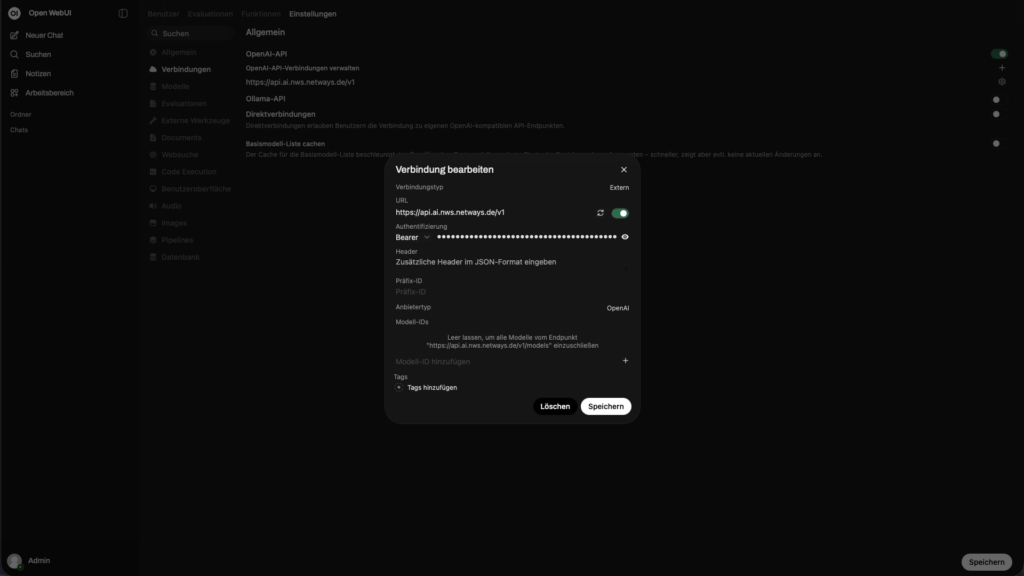
That’s it, the text model is now set up.
Now we can continue with the RAG settings. To do this, switch to the Documents tab.
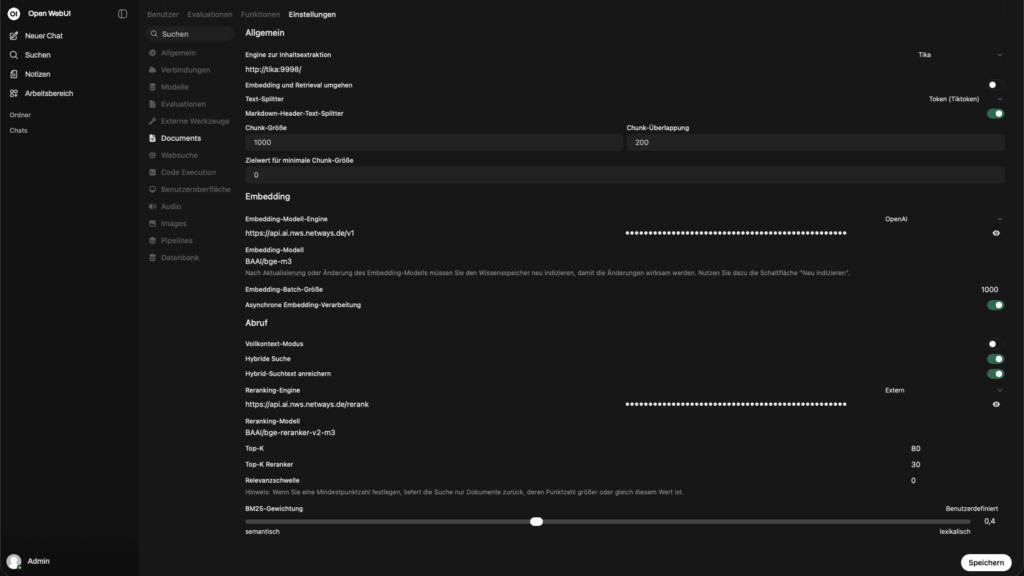
Recommended settings
– Content Extraction Engine: Set the option to Tika if you are running an Apache Tika locally, otherwise the default should remain.
Apache Tika is ideal for parsing almost all file formats (PDF, DOCX, PPTX, EPUB, HTML, emails, images with OCR, etc.) and extracts them as plain text and metadata. Without Tika, many documents are only indexed incompletely or not at all.
– Embedding and retrieval: From
– Text splitter: Tiktoken
Tiktoken is the official tokenizer from OpenAI (cl100k_base, o200k_base etc.). It splits the text as the LLM used would later see it, much more precisely than naive whitespace or sentence splitters.
– Chunk size and chunk overlap:
Typical: 500-800 tokens with 100-200 overlap.
Chunks that are too small lead to loss of context.
Chunks that are too large lead to poorer retrieval quality & higher costs.
– Markdown header text splitter: An
– Embedding model engine: Select OpenAI in the dropdown, then the URLhttps://api.ai.nws.netways.de/v1 and store the API key
– Embedding model : BAAI/bge-m3
Very good multilingual embedding model State-of-the-art in many benchmarks
– Embedding batch size: 1000
– Asynchronous embedding processing: An
Retrieve
– Full context mode: Off
– Hybrid search: On
– Enrich hybrid search text: To
– Reranking engine: Select External in the dropdown, then the URL https://api.ai.nws.netways.de/rerank and store the API key
– Reranking model: BAAI/bge-reranker-v2-m3
Cross-encoder, which sorts the initial top 50 results much better than a pure cosine ranking
– Top K (initial): 20-50
Top results
– Top K Reranker: 5-10
Get many top results, then filter aggressively with Reranker.
– Relevance Threshold: usually 0.0-0.18
Prevents very irrelevant chunks from being passed on anyway.
– BM25 Weight: ~0.4-0.6 (Custom)
Weighting between lexical (BM25) and semantic search. 0.5 is often a very good compromise.
Conclusion
Retrieval augmented generation is an effective concept for using large language models in a practical and reliable way. The combination of document extraction, vector search, optional reranking and the actual text generation means that even extensive or specific knowledge bases can be used efficiently.
RAG offers clear added value, especially in conjunction with your own data: more up-to-date information, fewer hallucinations and more comprehensible answers. Tools such as Open-WebUI make it comparatively easy to get started and enable powerful RAG pipelines to be implemented without in-depth model adjustments.
In short: RAG is no longer a topic for the future, but a tried-and-tested approach for productive AI applications.
You don’t just want to understand RAG, you want to use it productively?
Whether you need advice, a concept or the complete implementation of an individual RAG pipeline, we can support you.
We can help you set up a tailor-made solution, from the initial idea to the running system.
Simply get in touch with us and let’s implement your AI project together.




0 Comments