

Automation is no longer a luxury, but a powerful competitive advantage. Whether marketing, IT, support or product development, there are recurring processes everywhere that are time-consuming and error-prone.
This is where n8n comes into play: a flexible, expandable and open-source automation platform with which complex workflows can be implemented visually and efficiently.
In this article you will learn:
- What n8n is
- How it works
- What advantages it offers
- Typical use cases for n8n workflows
What is n8n?
Without any in-depth programming knowledge, n8n enables the automation of processes that would otherwise take a lot of time and manual work.
n8n (pronounced en-eight-en or nodemation) is a powerful, flexible automation tool that allows you to schedule tasks, exchange data between different applications and control processes across numerous tools, platforms and services.
You can think of it as a digital assistant that performs recurring tasks automatically: it connects different systems, schedules workflows and moves data between applications that don’t normally communicate directly with each other.
While traditional automation solutions often require extensive programming knowledge, n8n relies on a visual user interface with ready-made workflows. This means that even non-developers can implement complex automations without having to develop their own tools and instead focus on the essentials: Productivity.
At its core, n8n workflows enable you to:
- Transfer data between systems
- Automate processes
- Orchestrate APIs
- Visualize business logic
- Build AI and data pipelines
What’s special: n8n is open source and can be self-hosted.
Common use cases for n8n workflows
Notifications
One of the most popular uses of n8n is the automatic sending of notifications.
Depending on the selected trigger, a workflow can be configured to send messages to supported applications such as Slack, email, Telegram or SMS.
For example, team members can be automatically informed as soon as a new order is received in the online store.
Automated report generation
Regular reports for meetings often take a lot of time.
With n8n, these processes can be fully automated:
- Collect data from various sources
- Compile contents
- Create reports
- Automatically send links to participants
This means that all information is available on time, without any manual effort.
Web scraping and data collection
n8n is also ideal for collecting data from external sources.
Whether websites, internal systems or APIs, the data can be extracted, structured and stored directly in databases or anywhere else.
This is particularly useful for:
- Competitive analyses
- Price comparisons
- Market observations
- Media monitoring
- Internal evaluations
How do n8n workflows work?
n8n works with so-called nodes. Each node has a specific function:
- Trigger (e.g. webhook, schedule)
- Actions (e.g. send e-mail, save data)
- Control blocks (If, Switch, Merge)
- API requests
- Data processing
These nodes are linked together in a visual editor, similar to a flowchart.
Example: n8n workflow for GitHub release notifications
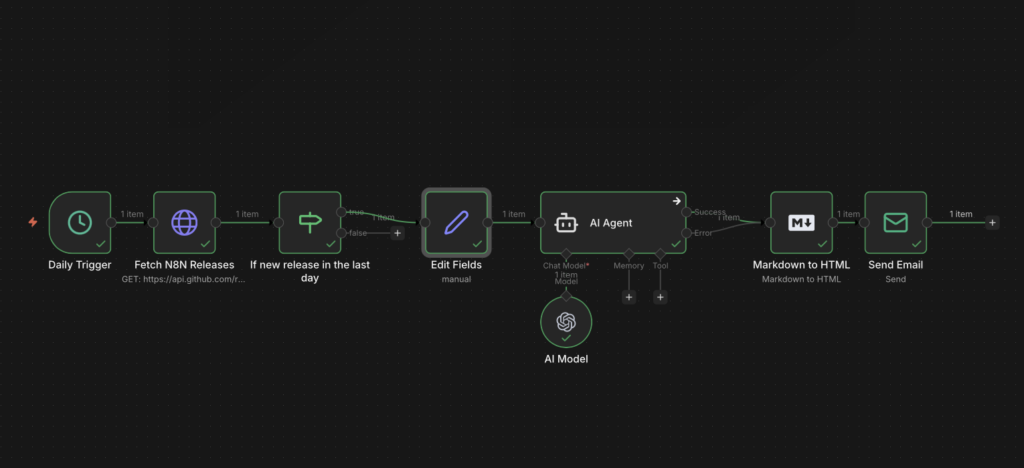
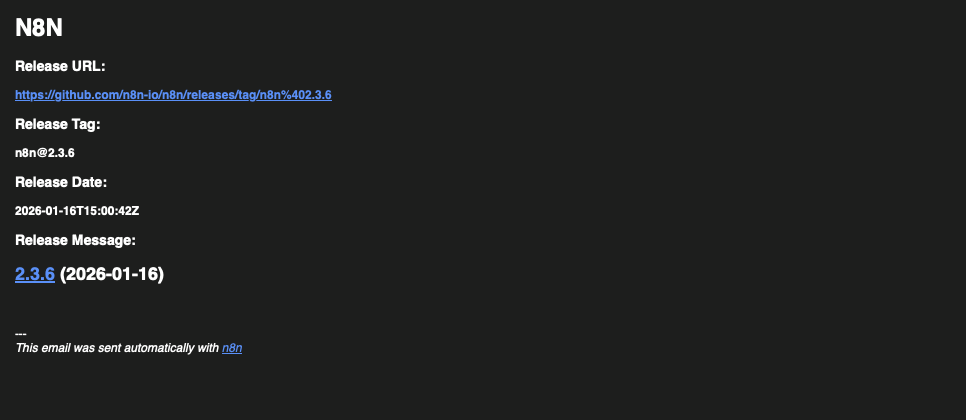
In the example, I would like to be informed about the latest GitHub release by n8n via email. The mail should contain the most important information for me and of course only be sent if the release is recent.
Task of the nodes used
- Trigger: triggers the daily n8n workflow
- HTTP request: queries the latest release
- If: checks whether the publication date is within the last 24 hours
- Edit Fields: extracts the fields Release Date, URL, Message and Tag from the response from GitHub
- AI Agent: creates the mail with the desired information in Markdown format (I specified the format in the system prompt)
- Markdown to HTML: as the name suggests, Markdown is converted to HTML so that the mail looks neat and tidy
- Send Mail: sends an e-mail to the specified e-mail addresses
The finished mail will look something like this:
The most important features of n8n
Open source, self-hosting and maximum control
A key advantage of n8n is its open source approach combined with flexible hosting options. The platform can be operated locally, on its own server or in containerized environments such as Docker or Kubernetes, without any licensing costs. This allows companies to retain full control over their data and processes at all times.
Visual workflow editor for complex processes
n8n offers a powerful visual workflow editor with which even complex automations can be clearly mapped. You can create workflows using drag-and-drop. Data flows, errors and intermediate results are directly visible, which makes debugging and the further development of automations much easier. Compared to many other tools, the interface remains well-structured and easy to understand, even with larger workflows.
Broad integrations and open interfaces
Mit über 400 integrierten Diensten deckt n8n bereits einen Großteil gängiger Anwendungen ab, darunter bekannte Plattformen wie Google, Slack, Nextcloud, GitLab, GitHub, Shopify oder AWS. Auch moderne KI-Dienste wie OpenAI lassen sich nahtlos einbinden. Sollte eine benötigte Integration nicht vorhanden sein, können externe Systeme problemlos über HTTP-Requests und APIs angebunden werden. Damit ist n8n nicht auf vorgegebene Integrationen beschränkt, sondern offen für nahezu jedes System.
Own logic, code and maximum flexibility
In contrast to simple automation tools, n8n workflows allow you to implement individual logic. Within workflows, you can execute your own JavaScript code to transform data, define conditions, build loops or intercept errors in a targeted manner. This makes n8n workflows suitable not only for simple automation, but also as fully-fledged workflow engines that can be used to implement complex business processes.
n8n workflows with AI as the core use case
n8n is ideal for setting up modern AI workflows. From chatbots and RAG systems to automated document processing or content creation, a wide variety of AI pipelines can be implemented. The platform supports many integrations – including our Managed AI Models, for example. This means that n8n workflows can be used for both experimental AI projects and productive, data-sensitive applications.
Conclusion:
n8n is an ideal solution for developers, technical teams and companies that value flexibility, scalability and data sovereignty. Especially in projects with high data protection requirements or complex automation needs, n8n shows its strengths and offers a powerful alternative to classic no-code and SaaS automation tools.
Get in touch with us to have your n8n hosted by us!




0 Comments