


CoreDNS is one of the unsung heroes of Kubernetes. It can be found in almost every Kubernetes setup and performs its tasks reliably and unnoticed. It can also be found in NETWAYS Managed Kubernetes®.
That’s why I was recently surprised to suddenly have to interact with CoreDNS myself as part of the Certified Kubernetes Administrator exam. Reason enough to take a closer look at its role in Kubernetes!
What is CoreDNS?
CoreDNS describes itself on its website as a DNS server written in Go. Its flexibility allows it to be used in a wide variety of environments, including Kubernetes. It offers service discovery based on etcd, Kubernetes and the DNS solutions of the major cloud providers, and is fast and flexible thanks to its plugin system.
Server blocks
The basic division into different routing blocks in CoreDNS is formed by so-called server blocks. These look as follows:
coredns.io:5300 {
    file db.coredns.io
}

example.io:53 {
    log
    errors
    file db.example.io
}

example.net:53 {
    file db.example.net
}

.:53 {
    kubernetes
    forward . 8.8.8.8
    log
    errors
    cache
}For each port defined in a server block, CoreDNS creates a server that forwards the incoming DNS queries to the appropriate server block according to the configuration. The following diagram visualizes the server blocks from the example from CoreDNS’ point of view.
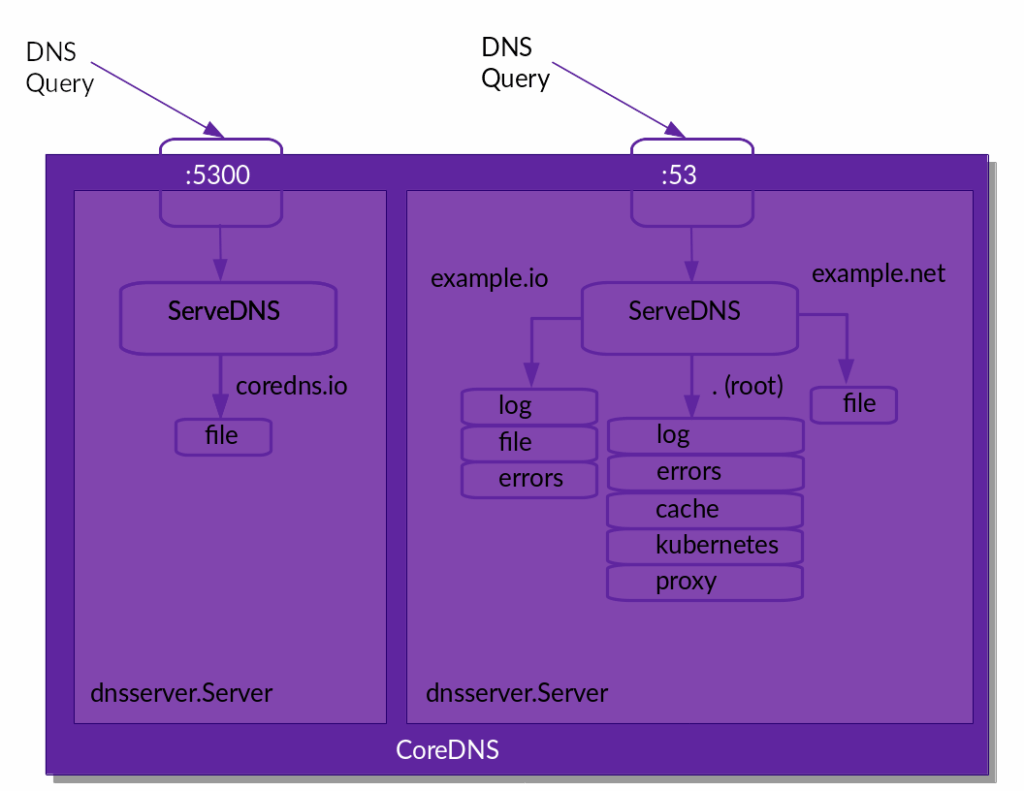
If CoreDNS has assigned the incoming DNS query to a server block, the plugins defined in the respective server block take over the further processing of the queries.
Plugins in CoreDNS
The large number of plugins forms the basis of the DNS server: they are integrated into the executable program at build time and provide all the functionality. In version 1.12.2, for example, the binary for macOS consists of 55 plugins:
$ coredns -version
    CoreDNS-1.12.2
    darwin/arm64, go1.24.4,

$ coredns -plugins | wc -l
55These plugins are chained, i.e. connected in series. The sequence is specified at build time by a file called plugin.cfg. The version for the officially published binaries can be found on GitHub.
This means that if additional plugins are added, the program will need to be rebuilt, including any necessary adjustments to plugin.cfg.
Behavior of plugins in CoreDNS
The different plugins fulfill different roles and behave differently depending on the situation. For each DNS query received by CoreDNS, a plugin can show one of these four reactions:
- Processing the query: The plugin processes the query, generates the response according to the function of the plugin and sends it back to the client.
- Ignore the query: If a plugin determines that it is not responsible for a query, it can also ignore it. In this case, the query is sent to the next plugin in the plugin chain. If the query has reached the end of the plugin chain and continues to be ignored, CoreDNS responds to the client with
SERVFAIL. - Processing the query with fallthrough: In principle, the plugin behaves in the same way as with normal query processing. However, if the response generated by the plugin is not satisfactory (e.g.
NXDOMAIN), the query can also be passed on to the next plugin in the plugin chain. - Query processing with note: Not every plugin is responsible for generating a response to a query. An example of this is the prometheus plugin, which generates metrics for Prometheus. It inspects the incoming query, but always passes it on to the next plugin in the plugin chain .
In addition, there are so-called unregistered plugins that do not deal with DNS queries, but influence the behavior of CoreDNS itself: bind, root, health and ready.
After this introduction to how CoreDNS works, it is now time to take a closer look at CoreDNS in the Kubernetes context.
CoreDNS in Kubernetes
For the following observations and experiments, I use KinD, a standardized way to set up a Kubernetes cluster locally on Docker. If you want to follow the examples, you will also need to install these tools on your local machine.
Cluster setup
First, of course, a cluster must be set up. This is done with a single KinD command, followed by 1-3 minutes of waiting time:
kind create cluster --name coredns-labOnce the cluster has been set up, you can already discover CoreDNS:
kubectl get pods -n kube-system

NAME                                                READY   STATUS    RESTARTS   AGE
coredns-674b8bbfcf-rdq5v                            1/1     Running   0          102s
coredns-674b8bbfcf-rr22p                            1/1     Running   0          102s
etcd-coredns-lab-control-plane                      1/1     Running   0          109s
kindnet-k9cb4                                       1/1     Running   0          102s
kube-apiserver-coredns-lab-control-plane            1/1     Running   0          109s
kube-controller-manager-coredns-lab-control-plane   1/1     Running   0          109s
kube-proxy-r6q84                                    1/1     Running   0          102s
kube-scheduler-coredns-lab-control-plane 1/1 Running 0 110sWell hidden in the kube-system namespace, it does its job alongside other fundamental workloads such as etcd, API server and scheduler. But which one exactly?
To answer this question, we can take a closer look at the CoreDNS configuration. In Kubernetes, this is normally stored as a ConfigMap with the name coredns, also in the namespace kube-system.
The CoreDNS Corefile in Kubernetes
kubectl get configmap -n kube-system coredns -o yaml

apiVersion: v1
data:
  Corefile: |
    .:53 {
        errors
        health {
           lameduck 5s
        }
        ready
        kubernetes cluster.local in-addr.arpa ip6.arpa {
           pods insecure
           fallthrough in-addr.arpa ip6.arpa
           ttl 30
        }
        prometheus :9153
        forward . /etc/resolv.conf {
           max_concurrent 1000
        }
        cache 30 {
           disable success cluster.local
           disable denial cluster.local
        }
        loop
        reload
        loadbalance
    }
kind: ConfigMap
metadata:
  creationTimestamp: "2025-07-09T14:38:11Z"
  name: coredns
  namespace: kube-system
  resourceVersion: "226"
uid: b59a1656-04df-40bd-ae3c-b765dd184ba0At data in the output, we find a single entry with the name Corefile, which contains the CoreDNS configuration. In the core file, we see the definition of a single server block (.:53), which accepts all queries on the standard port. The defined plugins with corresponding tasks are responsible for processing the incoming DNS queries.
The plugins errors, health, ready, prometheus, cache, loop, reload and loadbalance are mainly responsible for the configuration of CoreDNS itself. For example, they provide health and readiness endpoints for querying by Kubernetes, allow error messages to be logged or enable configuration to be reloaded without restarting CoreDNS.
The part of the CoreDNS configuration in Kubernetes that is actually relevant for DNS queries is – who would have thought it – the kubernetes plugin.
The kubernetes plugin
The configuration of the kubernetes plugin within the catch-all server block enables the resolution of service and pod addresses in Kubernetes. So let’s take a closer look at this part of the core file.
kubernetes cluster.local in-addr.arpa ip6.arpa {
    pods insecure
    fallthrough in-addr.arpa ip6.arpa
    ttl 30
}The plugin is configured so that it is responsible for DNS queries for the domain cluster.local (the default DNS suffix for Kubernetes clusters). In addition, it attempts to resolve reverse DNS queries for IPv4 (in-addr.arpa) and IPv6 (ip6.arpa).
In the actual configuration block of the kubernetes plugin, we then see three further settings:
pods insecureAllows reverse DNS queries for all pods, without verifying whether the desired pod actually exists or the IP is assigned elsewhere. This feature is mainly intended as backwards compatibility to kube-dns. In practice, CoreDNS always responds with the IP address contained in the query:10.244.0.3.kube-system.pod.cluster.local IN A 10.244.0.3fallthrough in-addr.arpa ip6.arpa: In the event that a pod wants to perform a reverse DNS query for services outside the cluster, a fallthrough is defined. In this case, the DNS query goes to the next plugin in the plugin chain. Otherwise, thekubernetesplugin would respond withNXDOMAIN.
In the case of our core file, the next plugin would beforward, which would attempt a lookup usingresolv.conf.ttl 30The time to live is set to 30 seconds for completed queries. This is a good compromise between sensible caching and short response times should services or pods change.
There are also other configuration options – for example, CoreDNS could also run outside a cluster and connect to it via an API endpoint for name resolutions. It is also possible to restrict DNS resolutions to individual objects or namespaces. A complete list of configuration options can be found in the documentation of the kubernetes plugin.
Example 1: Adding another cluster domain
As mentioned in the last paragraph, the default DNS suffix for Kubernetes Cluster is cluster.local. This can be adapted for many Kubernetes distributions during cluster installation. If you have forgotten this or would like to introduce another valid suffix for other reasons, you can easily do this by adapting the core file in the cluster.
First we open the ConfigMap with the core file in edit mode:
kubectl edit configmap -n kube-system corednsWe then add a new suffix my.cluster to the kubernetes block:
kubernetes my.cluster cluster.local in-addr.arpa ip6.arpa {
    pods insecure
    fallthrough in-addr.arpa ip6.arpa
    ttl 30
}Since the reload plugin is also configured, CoreDNS should automatically reload the configuration. The reload is logged, so we can see when the new configuration takes effect:
kubectl logs -n kube-system deploy/coredns -f

Found 2 pods, using pod/coredns-674b8bbfcf-rdq5v
maxprocs: Leaving GOMAXPROCS=8: CPU quota undefined
.:53
[INFO] plugin/reload: Running configuration SHA512 = 1b226df79860026c6a52e67daa10d7f0d57ec5b023288ec00c5e05f93523c894564e15b91770d3a07ae1cfbe861d15b37d4a0027e69c546ab112970993a3b03b
CoreDNS-1.12.0
linux/arm64, go1.23.3, 51e11f1
[INFO] Reloading
[INFO] plugin/reload: Running configuration SHA512 = cba5a092f893ab79c6f781e049eefe86ec640a8826a0df31b100ec96f4e446c6be8b2c8c7f6aea6ddebb4228cd022a7aacbc93ef7a0d38082dca4bb9d308c6fe
[INFO] Reloading completeOnce the reload is complete, we should be able to resolve the Kubernetes API at kubernetes.default.svc.my.cluster , for example:
kubectl run test-pod --image nginx
kubectl exec -it test-pod -- curl -v https://kubernetes.default.svc.my.cluster
*   Trying 10.96.0.1:443...
* Connected to kubernetes.default.svc.my.cluster (10.96.0.1) port 443 (#0)
* ALPN: offers h2,http/1.1
* TLSv1.3 (OUT), TLS handshake, Client hello (1):
*  CAfile: /etc/ssl/certs/ca-certificates.crt
*  CApath: /etc/ssl/certs
* TLSv1.3 (IN), TLS handshake, Server hello (2):
* TLSv1.3 (IN), TLS handshake, Encrypted Extensions (8):
* TLSv1.3 (IN), TLS handshake, Request CERT (13):
* TLSv1.3 (IN), TLS handshake, Certificate (11):
* TLSv1.3 (OUT), TLS alert, unknown CA (560):
* SSL certificate problem: unable to get local issuer certificate
* Closing connection 0
curl: (60) SSL certificate problem: unable to get local issuer certificate
More details here: https://curl.se/docs/sslcerts.html

curl failed to verify the legitimacy of the server and therefore could not
establish a secure connection to it. To learn more about this situation and
how to fix it, please visit the web page mentioned above.
command terminated with exit code 60The DNS query works. The IP of the Kubernetes service is resolved correctly.
Example 2: Restricting the DNS service to individual namespaces
For the second example, we want to restrict the resolution of DNS queries in the cluster to the namespace default. In this way, the Kubernetes API service, for example, can still be resolved, while queries for services in other namespaces fail.
To do this, we edit the CoreDNS core file again and add a namespaces entry to the configuration of the kubernetes plugin.
kubectl edit configmap -n kube-system corednskubernetes my.cluster cluster.local in-addr.arpa ip6.arpa {
pods insecure
fallthrough in-addr.arpa ip6.arpa
ttl 30
namespaces default
}We can watch again as the configuration of CoreDNS is reloaded:
kubectl logs -n kube-system deploy/coredns -fWe can then test the effectiveness of the configuration again using our test-pod:
kubectl exec -it test-pod -- curl -v https://kubernetes.default.svc.my.cluster
*   Trying 10.96.0.1:443...
* Connected to kubernetes.default.svc.my.cluster (10.96.0.1) port 443 (#0)
...

kubectl exec -it test-pod -- curl -v https://kube-dns.kube-system.svc.my.cluster
* Could not resolve host: kube-dns.kube-system.svc.my.cluster
* Closing connection 0
curl: (6) Could not resolve host: kube-dns.kube-system.svc.my.cluster
command terminated with exit code 6As expected, the kubernetes service can still be resolved as it is located in the default namespace. However, the kube-dns service in the kube-system namespace can no longer be resolved.
Conclusion
CoreDNS works quietly and reliably in almost every Kubernetes cluster. So reliable that you often hardly notice it in everyday life. But its strength lies precisely in this inconspicuousness: it forms the backbone for DNS resolutions in the cluster and thus enables essential functions such as service discovery and communication between pods and services.
This blog post shows that it can be worth taking a closer look at CoreDNS. Not only to prepare for certifications such as the CKA, but above all to better understand the behavior of your own cluster and to optimize it in a targeted manner. Whether additional cluster domains, restrictions to certain namespaces or tuning the DNS cache: CoreDNS offers impressive flexibility thanks to its modular structure and plugin-based architecture.
If you would like to try out or read more about CoreDNS, here is the link to the CoreDNS documentation. And if these resources are not enough or if you still have questions, our MyEngineers® are always available to help and advise you.




0 Comments