


More than 10 years after its release, the Kubernetes project has found its way into the mainstream. The best proof of this is the large number of available solutions: (almost) every cloud provider has managed Kubernetes on offer, as well as a large number of freely available Kubernetes distributions for a wide range of applications.
In today’s blog post, we would like to take a closer look at one of these distributions: K3s promises lightweight Kubernetes, […] built for IoT and Edge computing. But what does that actually mean?
Build your K3s cluster in the MyNWS Cloud on inexpensive and high-performance cloud servers.
Expand your cluster with load balancers, S3 storage and much more, and build the solution that suits you!
The motivation behind K3s
K3s is a lightweight Kubernetes distribution and is suitable for IoT environments or edge computing, among other things. These environments are usually characterized by fewer available resources and longer maintenance cycles than in classic data centers, for example.
These characteristics result in some of the significant advantages and special features of K3s:
- a single binary: unlike other Kubernetes distributions, K3s consists of a single binary that bundles all required components, from container runtime to ingress controller and CNI.
- < 70MB: Ideal for fast downloads, updates, and environments with little persistent memory.
- Available on many computer architectures: K3s is compatible with x86_64, ARMv7 and ARM64.
- Simple configuration: All basic options and many advanced features of K3s can be specified either via environment variables, configuration file or command line argument.
- Simple scaling: New cluster nodes can be automatically added to the cluster by specifying a token – regardless of whether they are control planes or worker nodes.
But how does K3s accomplish all this? Let’s take a look at the architecture of K3s.
K3s components at a glance
On the project website we find the following diagram:
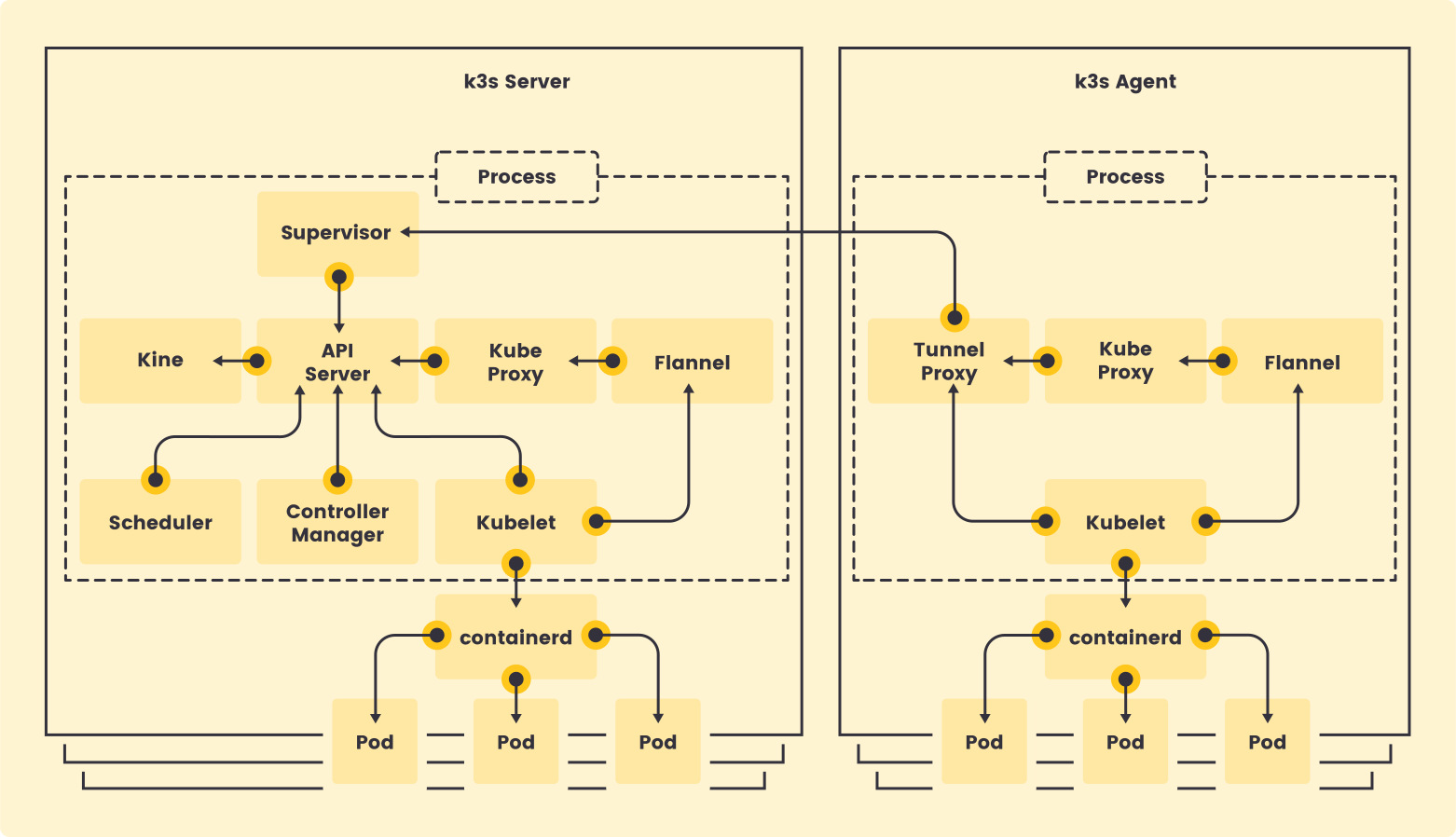
At first glance, it doesn’t look much different from other Kubernetes distributions. We see a container runtime (containerd), the various components of Kubernetes itself (API server, scheduler, Kubelet, Kube proxy), a container networking interface (flannel) and a few other components.
K3s node components
The special feature: All components that we see in this graphic are bundled and orchestrated by the k3s binary; in addition, there are further components that are not shown here. Overall, a K3s installation includes the following services and help tools at node level :
- Kubernetes: The usual components and controllers of a Kubernetes cluster; API server, kube-proxy, controller-manager, cloud-controller-manager, scheduler and kubelet.
- containerd: The container runtime that is instrumentalized by kubelet via the Container Runtime Interface (CRI) to run workloads on the nodes.
- Kine: An auxiliary tool that enables Kubernetes to use alternative data backends such as sqlite, PostGres or MySQL instead of etcd .
- kubectl: The official Kubernetes CLI
- crictl: A CLI for interacting with CRI-compliant container runtimes.
- ctr: an unofficial CLI for containerd.
K3s cluster components
In addition, a standard installation of K3s includes some tools at cluster level that are automatically installed when a cluster is set up:
- Flannel: A lightweight container networking interface (CNI) for Kubernetes. More information can be foundin the project’s GitHub repository.
- Traefik Ingress Controller: A lightweight, cloud-native Ingress controller.
- ServiceLB: a load balancer controller that works independently of the K3s cluster environment (formerly Klipper).
More detailed information on how it works can be found in the K3s documentation. - CoreDNS: a cloud-native DNS and service discovery service, the default for Kubernetes. More information can be found on the project’s website.
- Local Storage Provisioner: A storage driver for Kubernetes that enables the creation of
PVCson the local storage of the nodes. More information and examples can be found in the K3s documentation. - Metrics Server: A scraper for metrics of the K3s cluster and the workloads running in it, developed and managed by the Kubernetes Special Interest Groups (SIGs). More information can be found in the project’s GitHub repository.
- Helm Controller: A Kubernetes controller for installing Helmcharts by creating
CustomResourceDefinitions(CRDs) in the K3s cluster. In this way, the installation of any applications can be simplified, for example at the time of cluster creation.
More information on usage can be found in the K3s documentation.
The installation of these components can be activated or deactivated as required in order to achieve a cluster that is even better adapted to the environment. But how do you install K3s in the first place?
Installation of K3s at a glance
K3s offers a Curl to Bash (often also Pipe and Pray) command for easy installation:
curl -sfL https://get.k3s.io | sh - This command downloads the K3s binary and installs a single node Cluster with all available add-ons. The persistent data backend is sqlite .
After successful installation, the status of the cluster can be displayed using the kubectl command, which is also integrated in K3s:
sudo systemctl show k3s --property=ActiveState
ActiveState=active

sudo k3s kubectl get nodes
NAME     STATUS   ROLES                  AGE     VERSION
ubuntu   Ready    control-plane,master   3m29s   v1.31.4+k3s1

sudo k3s kubectl get pods -A
NAMESPACE     NAME                                      READY   STATUS      RESTARTS   AGE
kube-system   coredns-ccb96694c-wg82j                   1/1     Running     0          3m42s
kube-system   helm-install-traefik-5xfzh                0/1     Completed   1          3m42s
kube-system   helm-install-traefik-crd-drqpd            0/1     Completed   0          3m42s
kube-system   local-path-provisioner-5cf85fd84d-mvm46   1/1     Running     0          3m42s
kube-system   metrics-server-5985cbc9d7-xckzr           1/1     Running     0          3m42s
kube-system   svclb-traefik-16fa2585-lf4jt              2/2     Running     0          3m29s
kube-system traefik-57b79cf995-lpskx 1/1 Running 0 3m29sAs expected, the k3s systemd service is running, the cluster consists of a single node, and the previously mentioned add-ons ( Traefik, ServiceLB, etc.) are running in the cluster.
The token for adding worker nodes to this cluster has been generated and stored at /etc/rancher/node/password.
K3s in HA mode
In production environments at the latest, you normally don’t want to do without operation with High Availability (HA) – this scenario can also be achieved very easily with K3s.
When installing the first server, a token and the node role server must be specified. The missing, 2, 4, …, control plane nodes can then be integrated into the cluster by specifying the same token and the API end point for registration.
# Initialize the cluster on the first node
curl -sfL https://get.k3s.io | K3S_TOKEN=${SECRET_TOKEN} sh -s - server --cluster-init

# Join additional control plane nodes
curl -sfL https://get.k3s.io | K3S_TOKEN=${SECRET_TOKEN} sh -s - server \
--server https://192.168.1.10:6443After a short time, a highly available cluster consisting of several control plane nodes is created. A highly available etcd cluster, which is also managed by K3s, is used as the persistent data backend by default:
sudo k3s kubectl get nodes
NAME      STATUS   ROLES                       AGE     VERSION
ubuntu    Ready    control-plane,etcd,master   21m     v1.31.4+k3s1
ubuntu2   Ready    control-plane,etcd,master   3m11s   v1.31.4+k3s1
ubuntu3   Ready    control-plane,etcd,master   2m54s   v1.31.4+k3s1

sudo kubectl get pods -A
NAMESPACE     NAME                                      READY   STATUS      RESTARTS   AGE
kube-system   coredns-ccb96694c-wg82j                   1/1     Running     0          22m
kube-system   helm-install-traefik-5xfzh                0/1     Completed   1          22m
kube-system   helm-install-traefik-crd-drqpd            0/1     Completed   0          22m
kube-system   local-path-provisioner-5cf85fd84d-mvm46   1/1     Running     0          22m
kube-system   metrics-server-5985cbc9d7-xckzr           1/1     Running     0          22m
kube-system   svclb-traefik-16fa2585-748qt              2/2     Running     0          3m49s
kube-system   svclb-traefik-16fa2585-74v6n              2/2     Running     0          3m37s
kube-system   svclb-traefik-16fa2585-lf4jt              2/2     Running     0          21m
kube-system traefik-57b79cf995-lpskx 1/1 Running 0 21mCompared to our single-node cluster, we see that three Pods are running for svclb-traefik, exactly one per node. This is necessary to simulate the LoadBalancer service for the Traefik IngressController without external services.
For additional worker nodes , a token is also generated in this setup at /etc/rancher/node/password on the control plan nodes.
Configuration of K3s at a glance
K3s can be configured in three different ways:
- Environment variables: Environment variables in the form
K3S_SOME_VALUEare taken into account when installing the binary and during service restarts. - Command line arguments: Command line arguments and parameters are taken into account for the installation of the binary and for service restarts, e.g.
serveror--cluster-init, as shown above. - Configuration file: A configuration file in YAML format can also be used. This is located by default at
/etc/rancher/k3s/config.yaml. The file can in turn be referenced using an environment variable (K3S_CONFIG_FILE) or command line argument (-c,--config). A configuration distributed over several files under/etc/rancher/k3s/config.yaml.dis also possible.
For increased flexibility and control during installation and configuration, the three options can be combined as required. For example, the following binary calls are equivalent:
K3S_TOKEN=supersecret k3s server --agent-token=alsosecret

K3S_AGENT_TOKEN=alsosecret k3s server --token=supersecretA detailed overview of the available configuration options and their use via CLI, environment variables or configuration file can be found in the K3s documentation.
It is important to note that certain settings must be identical on all control plane nodes for the cluster to function properly. This concerns, among other things, the (de)activation of add-ons such as Traefik, ServiceLB or Flannel.
Myths about K3s
If you have read this far, you may still have a few burning questions – rumors and statements that you can often read at conferences, in tutorials and blog posts. I would like to address a few of these “myths” at the end of this blog post.
“K3s does not support NetworkPolicies”
For many security-conscious users, this is already a knock-out argument. The reason for this is the standard use of flannel as a CNI, which does not actually support network policies. For this reason, the K3s project has built a NetworkPolicy controller into K3s itself.
This can be switched on and off as required, e.g. if you want to use a different CNI (e.g. Cilium) from the outset. The implementation and configuration details can be found in the K3s documentation.
It should therefore be noted that K3s does indeed support NetworkPolicies, despite the flannel, without the need for additional configuration.
“K3s is not suitable for production environments because of sqlite”
In its “minimal form”, K3s uses sqlite as a data backend for the state of the cluster, as shown in the first example of this blog post. This fact is often used as an argument to justify the unsuitability of K3s for “real” workloads and usage.
However, this is not correct – in the second example, K3s already uses a highly available etcd cluster that is automatically managed for us and runs automatically on the controlplane nodes. Alternatively, an external etcd cluster can also be referenced or dedicated etcd nodes can be created via K3s.
But that’s not all: if a team is more experienced in dealing with a relational database such as MySQL or PostgreSQL, this option can also be considered for an external, highly available data backend thanks to kine .
Contrary to common practice, a highly available K3s cluster could also be implemented with just two nodes, as the odd number of control plane nodes is only required for an etcd quorum.
More information about high availability and external data backends for K3s can be found in the K3s documentation.
“K3s is too opinionated”
As already seen in the example installation of K3s, some services are installed in the cluster right from the start, including such essential components as Traefik as IngressController. These specifications do not please everyone – some organizations have clear specifications as to which tools are to be used and which configuration is to be used.
K3s allows all preconfigured components to be deactivated at any time. This is possible by means of a simple reconfiguration, which is described in detail in the K3s documentation.
In a similar way, any other manifest could be installed when initializing a K3s cluster. So you don’t have to sacrifice flexibility and your own preferences and requirements, nor do you have to reinvent the wheel – K3s offers enough options for integration.
K3s – an option for your next project?
Whether “Kubernetes on the edge”, in the home lab, or simply as a resource and money-saving alternative for your next Kubernetes cluster in the cloud – K3s could be an alternative. With its focus on easy setup, flexible configuration and diverse integration options, it is the perfect choice for test and CI/CD environments, smaller projects, or proofs of concept (POCs).
In the MyNWS Cloud, you can operate a highly available K3s cluster based on OpenStack for less than €50 per month, for example. Alternatively, K3s can also be operated on single board computers (SBCs) or Raspberry Pis. The possibilities are limited only by your creativity and willingness to experiment!
We at NWS are excited to see which project you will tackle next with Kubernetes and K3s!




0 Comments