

Imagine that your company has opted for a microservice architecture. As you develop and deploy more and more microservices, you decide to orchestrate them using Kubernetes. You start writing YAML manifests and additional configurations and deploy the necessary tools in your cluster. At some point, you switch to Kustomize or Helm for configurability reasons.
You may end up using ArgoCD or Flux for a GitOps approach. At some point, Kustomize and Helm are no longer enough – too much YAML, too little overview of what you’re actually doing. You find yourself researching and comparing Kubernetes deployment tools.
Regardless of whether you had to imagine this scenario in your head or experienced it yourself (or are currently experiencing it) – it’s not a nice state of affairs. Helm and Kustomize are reliable, well-established tools that are deeply integrated into the Kubernetes ecosystem. However, they lack usability and ergonomics, and they don’t really offer a great developer experience – it’s time for a successor!
Since you and I are not the only ones who feel this way, there are a handful of tools out there today that all try to solve different application deployment problems on Kubernetes, and I’ll compare these Kubernetes deployment tools for you.
Let’s take a look at them: Timoni, kapp and Glasskube.
Timoni – Distribution and lifecycle management for cloud-native applications
Timoni promises to bring the CUE features for type safety, code generation and data validation to Kubernetes to make building complex deployments a pleasant experience – that sounds good! But what is CUE?
CUE is an open source data validation language that has its roots in logic programming. As such, it sits at the intersection of state description, state derivation and state validation – sounds like a perfect solution for a deployment tool, but how does it work?
Timoni is built on four concepts – modules, instances, bundles and artifacts, each with its own implications and associated actions in the Timoni CLI:
- Timoni modules are a collection of CUE definitions and constraints that form a CUE module of an opinionated structure.
These modules accept a set of defined input values from a user and generate a set of Kubernetes manifests as output provided by Timoni in your Kubernetes cluster(s).
Timoni modules can be considered as equivalent to e.g. Helm Charts. - Timoni instances are existing installations of Timoni modules within your cluster.
With Timoni, one and the same module can be installed multiple times in a cluster, with each instance having its own set of provided values.
Timoni instances can be regarded as equivalent to Helm releases. - Timoni bundles allow authors to deliver and deploy both module references and instance values within the same artifact.
In this way, applications can be delivered together with their required infrastructure.
Timoni bundles can be seen as the equivalent of umbrella charts in Helm. - Timoni artifacts are the intended way to distribute modules and bundles.
Timoni comes with its own OCI media types and sets additional metadata from Git metadata to enable reproducible builds.
In this way, modules and bundles can be signed and compared with each other and distributed securely.
The bottom line
A comparison of Timoni with existing Kubernetes deployment tools such as Helm or Kustomize reveals a number of advantages:
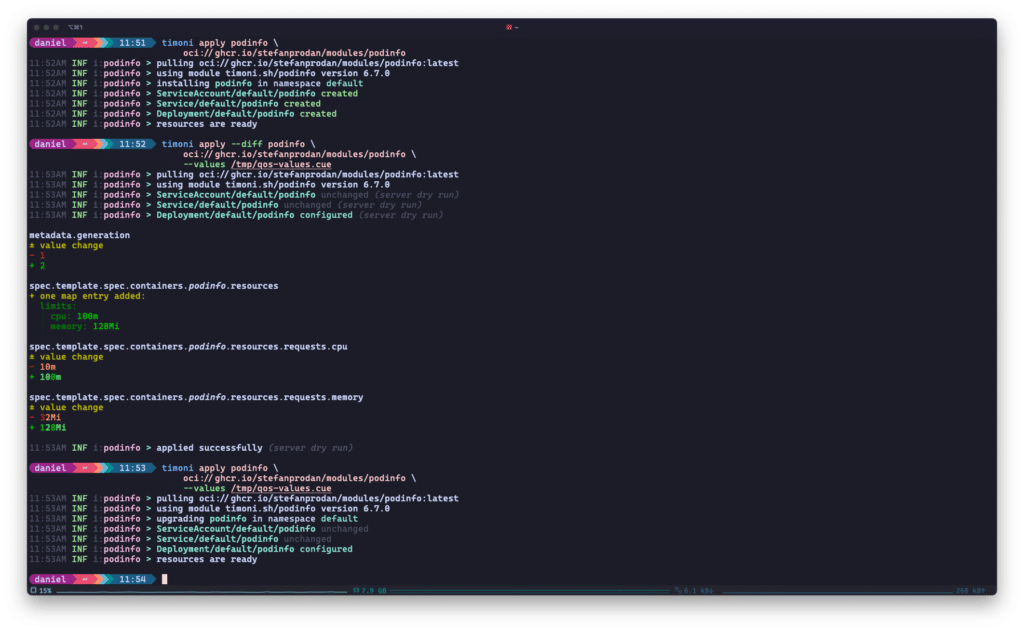
- Speed: Timoni uses Kubernetes’ server-side apply in combination with Flux ‘s drift detection and only patches the manifests that have changed between upgrades.
- Detail: Timoni can tell you exactly what it will change, right down to the Kubernetes resources and their properties.
- Validation: Since modules are a collection of CUE definitions and constraints, Timoni can enforce correct data types or even values (e.g. enums) for deployments.
- Security and distribution: While Helmcharts can be distributed as OCI artifacts since last year, they still lack reproducibility in some areas.Kustomize does not offer any distribution mechanisms.
Timoni has thought of these things from the beginning and offers a lean, supported and secure way of distribution.
Overall, Timoni could be a good choice for you if you are looking for speed, security and correctness in a Kubernetes deployment tool. Timoni can deploy large and complex applications consisting of many manifests while defining configuration constraints for operators with CUE.
The downside is that CUElang itself has a learning curve and is not agnostically “GitOps-ready”: while there is a documented way to use Timoni with Flux, there is no equivalent for e.g. ArgoCD. This will probably change as soon as Timoni’s API matures.
Next, let’s take a look at kapp and see how it can simplify Kubernetes deployments!
kapp – Take control of your Kubernetes resources
kapp is part of Carvel, a set of reliable, compatible, single-purpose tools that help you create, configure and deploy applications for Kubernetes. According to the website, it’s lightweight, explicit and dependency-aware. Let’s take a look at it:
- lightweight: kapp is a client-side CLI that does not rely on server-side components and can therefore function in environments with limited RBAC, for example.
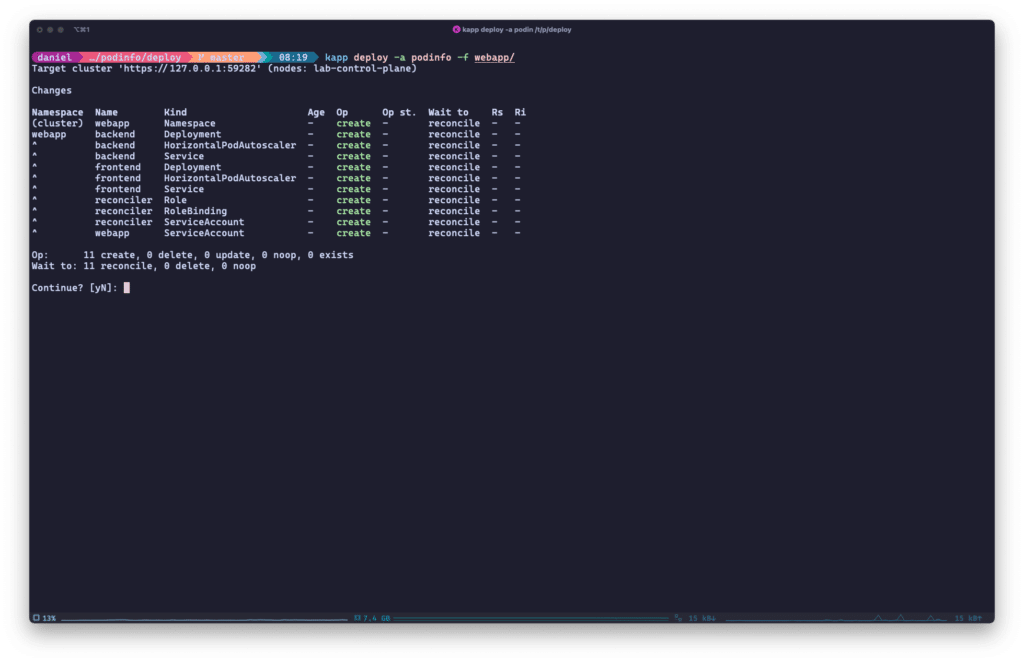
- explicit: kapp calculates the creation, deletion and updating of resources in advance and reports them to the user. It is up to the user to confirm these actions.
kapp also logs the deployment process during installation in great detail. - dependency-aware: kapp orders the resources it is supposed to install. This means that e.g. namespaces or CRDs are applied before other resources that may depend on them.
It is possible to add custom dependencies, e.g. to run housekeeping jobs before or after an application upgrade.
Similar to Timoni, kapp lays out in great detail what it will do on your behalf and guides you through the process of deploying your application(s):
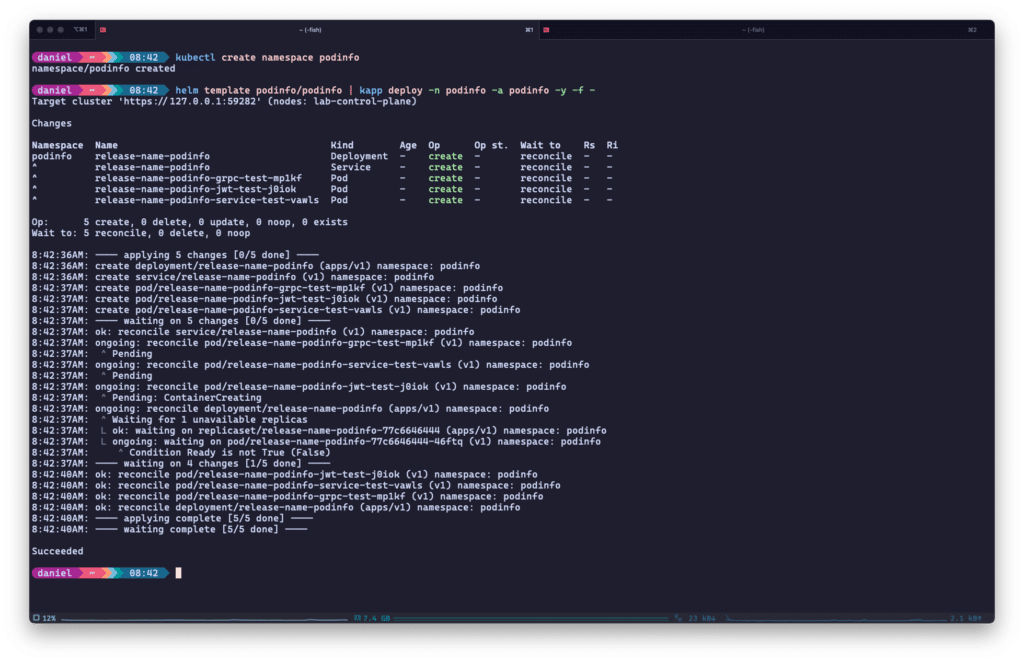
Unlike Timoni, you don’t necessarily have to write a custom application configuration yourself – kapp can build on existing solutions like Kustomize, Helm or ytt, another Carvel tool for templating and patching YAML. See the following example with the podinfo Helmchart:
After deployment, kapp can provide insights into your Kubernetes deployments: From reconciliation status to linked ServiceAccounts or ConfigMaps to the labels of your applications – kapp has it all under control.
If you’re more concerned about Day 2 operations and automation, kapp has another ace up its sleeve: kapp-controller. Combine these two Carvel tools and you get a GitOps-enabled, fully automated solution for Kubernetes deployments. kapp-controller introduces a set of CRDs to manage apps and/or deploy them as packages, PackageRepositories and PackageInstallations. These CRDs can in turn be deployed by your GitOps solution, for example.
The bottom line
These features make kapp a solid choice if you’re looking for one or more of the following strengths when comparing Kubernetes deployment tools:
- Correctness: kapp lists all pending changes to your application deployments, be it creation, deletion or patch, and asks for confirmation by default.
kapp also keeps you up to date throughout the entire deployment and displays the status of your deployment at all times. - Easy deployment: With kapp, you don’t need to rewrite existing deployment configurations, manifests, Helm charts or Kustomize structures.
Simply add kapp to your deployment pipeline and take advantage of the added value it offers. - GitOps-enabled: With kapp-controller in combination with kapp, you can use declarative CRDs to manage your application deployments.
You also have the option of managing different versions of deployments as packages.
We’ve already looked at two Kubernetes deployment tools so far, but you know what they say: “All good things come in threes!”
So let’s take a look at the last tool for today – Glasskube.
Glasskube – the next generation package manager for Kubernetes
Reading about the next generation of package managers for Kubernetes certainly raises some expectations – but Glasskube’s steep rise to ~2400 GitHub stars and the startup’s recent inclusion in the Y Combinator incubator can be taken as signs that Glasskube could indeed be the next (or first?) package manager for Kubernetes.
Glasskube is completely open source (like Timoni and kapp), has an integrated user interface and promises to be both enterprise-ready and integrable into Gitops. The project also hosts a public registry of tested and verified packages that anyone can review and use in their clusters.
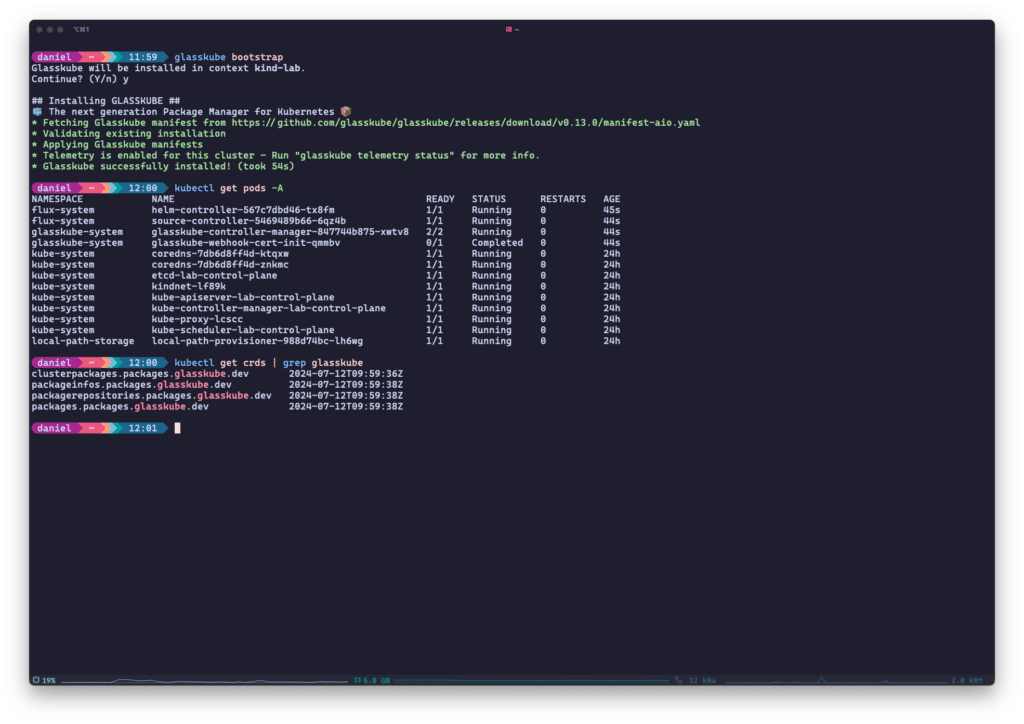
But now let’s move on to the technical details. The heart of Glasskube is its CLI, which is also required for bootstrapping the Glasskube components in the cluster. This is Glasskube’s own controller manager, which runs two controllers, as well as Flux‘s Helm and Source controllers. If you are already using Flux within your cluster, you can skip the installation of the Flux components altogether.
In addition to these controllers, Glasskube will also install some CRDs in your cluster to manage packages, repositories and package installations for you.
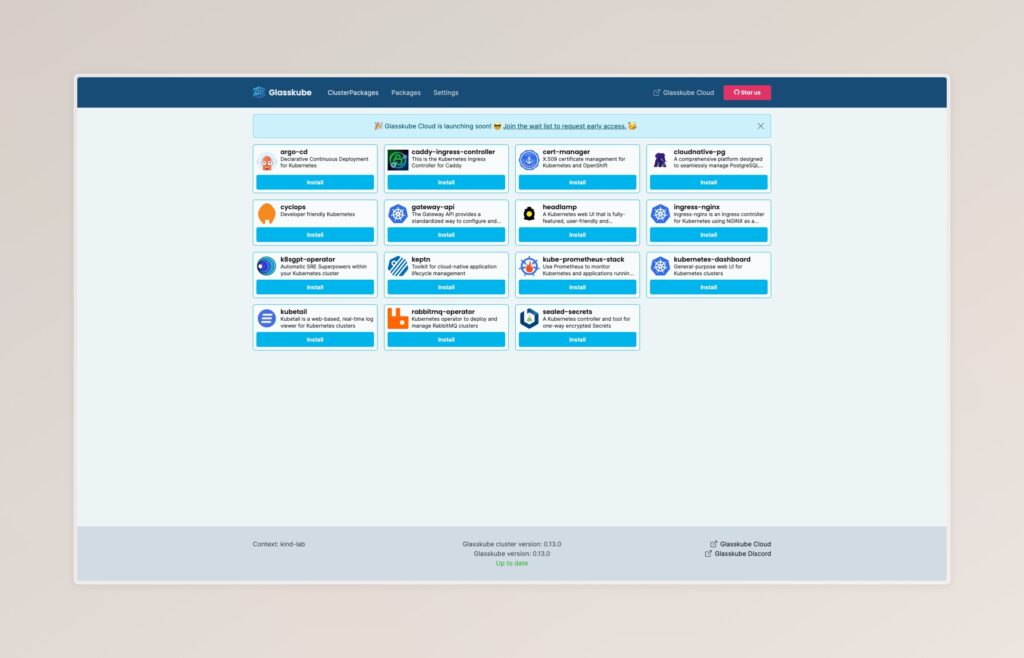
The UI, on the other hand, does not run within the cluster; it is started locally via the CLI and offers a very simple way to install packages in your cluster.
Glasskube distinguishes between ClusterPackages, which are installed in a cluster-wide context (e.g. operators), and packages, which are installed in namespace-bound contexts. Within your cluster, these package installations are persisted as CustomResources. The same applies to registries that you can configure via the CLI, including authentication.
Just like kapp, Glasskube builds on existing solutions – Helm or pure YAML manifests – to deploy packages in Kubernetes. A Glasskube package defines configurable values, including description, constraints, etc., which are displayed to the user in the UI or terminal during installation. These value definitions support both value literals and lookups that originate from other cluster resources.
Glasskube processes and validates these values before inserting them into the underlying Helm values or YAML manifests.
The bottom line
With this information, we can identify some key points of Glasskube, as with the other Kubernetes deployment tools:
- Ease of use: With its automated bootstrap process, client-side UI and more and more packages available out of the box, Glasskube is perfect for creating PoCs and “trying things out”.
- Dependency management: As a package manager, Glasskube promises full dependency management.
This is already a reality, e.g. the cert-manager package is also installed as a dependency when the Keptn package is installed. - GitOps-ready: like kapp, Glasskube can be used to deploy applications declaratively thanks to its CRDs.
In the further development process of the project, I would like the UI to include more features for multi-tenancy and user governance. However, if this is not the case, it will still be possible to create your own customized user interfaces thanks to the underlying CRDs that capture the configuration and deployment status.
Quo Vadis, Kubernetes Deployments?
Helm and Kustomize are pillars and standards of the Kubernetes ecosystem. However, a new generation of deployment tools is in some ways standing on the shoulders of these giants and trying to improve on the status quo.
After comparing these three Kubernetes deployment tools, it is clear that correctness, distribution and automation are the focus of Timoni, kapp and Glasskube:
- All three solutions have found a way to validate user input and/or make deployment processes easier to understand.
- All three solutions are working on better ways of distributing and obtaining applications.
Timoni with its modules and bundles, kapp (or kapp-controller) with its package CRD and Glasskube with its (cluster) package CRDs. - All three solutions emphasize their ability to integrate with GitOps practices in their documentation.
Automation and declarative configuration of infrastructure and application deployments have become a de facto standard in Kubernetes, and the new generation of Kubernetes deployment tools knows this.
kapp and Glasskube offer very clear migration paths when coming from Helmcharts or YAML manifests – just build on your existing solutions and extend or refactor them over time.
Timoni, on the other hand, comes with the initial cost and learning curve of CUE, but promises very high performance and probably the best input validation of the three tools compared.
No matter which path you end up taking, I hope this article sheds some light on the options that are out there today. Be sure to check out our tutorials on Kubernetes and subscribe to our newsletter to stay up to date from now on!




0 Comments