

In many cases, it is helpful for applications to know the source IP of a request. With this information, your application can do many useful things, e.g. use GeoIP data to display the appropriate language for the visitor on a website.
Unfortunately, in the cloud and especially in Kubernetes, a user’s request rarely arrives at your application without detours: Load balancers, ingress controllers, or gateways often forward the request several times before the actual target receives it. In order not to lose sight of the actual origin of a request during this odyssey, there are two useful settings: The HTTP X-Forwarded-For (xff) header and the proxy protocol.
In the past, we already created a tutorial discussing how to set up these tools for ingress controllers in Kubernetes. As the Gateway API in Kubernetes is gaining more and more popularity, we will now take a look at how you can achieve the same configuration for Gateway APIs using kgateway as an example.
You can find the resources discussed in this tutorial including setup instructions on GitHub
Prerequisites
For this tutorial, you will need a Kubernetes cluster, Helm, and kubectl. You can find the resources used in this tutorial on GitHub.
You can either create a Kubernetes cluster in MyNWS or use an existing cluster with load balancer support.
You should also make a note of your current IPv4 address so that you can test the functionality of the various configurations later. You can easily display your IP using cURL and icanhazip.com, for example:
curl ipv4.icanhazip.comThe default scenario
If you look at a Kubernetes cluster in production, it often offers the following options in terms of networking:
- Automatic provisioning of external load balancers (by cloud providers or projects such as MetalLB or Cilium)
- Routing of network traffic within the cluster (by CNIs, ingress controllers or gateway controllers)
In practice, this often means that external requests reach the actual application after two “hops” at the earliest. In NETWAYS Managed Kubernetes®, which is based on OpenStack, you can imagine it like this:
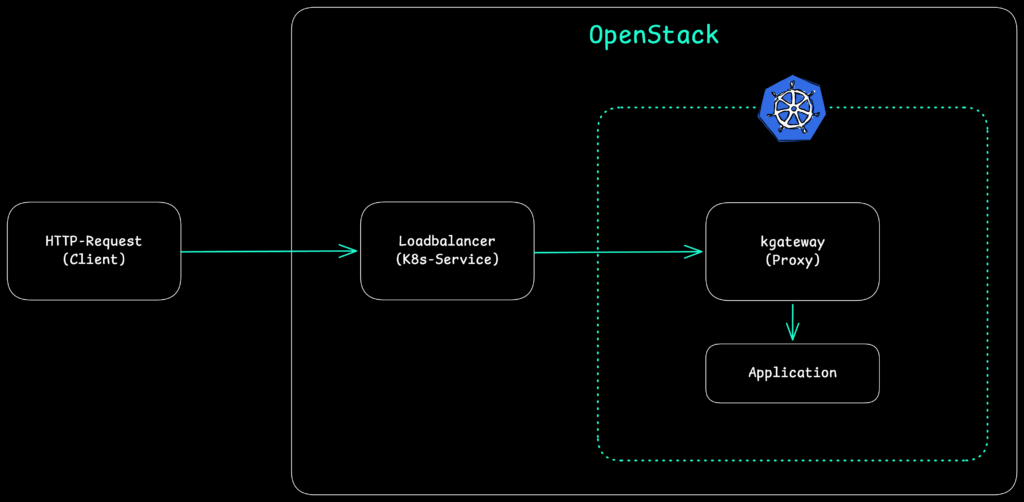
With these forwardings by load balancers and/or proxies in the cluster, the original IP address of the request is lost – it is replaced by the IPs of the load balancer or the proxy. If you want to avoid this, you can configure X-Forwarded-For (xff) HTTP headers or use the proxy protocol depending on the type of incoming requests.
But first, let’s set up the environment for this tutorial and check the default behavior.
Step 1: Setup and default behavior of kgateway
Once you have created a cluster, you must first install the CustomResourceDefinitions (CRDs) of the Gateway API and a gateway controller. In this tutorial, we use the CNCF project kgateway as our gateway controller, which in turn relies on Envoy as a proxy:
# Installation of Gateway API CRDs
kubectl apply -f https://github.com/kubernetes-sigs/gateway-api/releases/download/v1.4.0/standard-install.yaml

# Installation of kgateway CRDs and Controller
helm upgrade -i --create-namespace \
  --namespace kgateway-system \
  --version v2.2.1 kgateway-crds oci://cr.kgateway.dev/kgateway-dev/charts/kgateway-crds

helm upgrade -i -n kgateway-system kgateway oci://cr.kgateway.dev/kgateway-dev/charts/kgateway \
  --version v2.2.1
The installation of kgateway with Helm creates the following resources in the cluster (in addition to CRDs):
- a Deployment
kgatewaythat manages and configures the Gateways we have defined - a GatewayClass
kgateway, which defines the project’s standard configuration for Gateways
For the following scenarios and to check the standard behavior of kgateway, we next start a small application called http-https-echo in the namespace default of our cluster and make it accessible via a service:
kubectl run gw-test --image mendhak/http-https-echo
kubectl expose pod gw-test --port 80 --target-port 8080We can now make this service available to external users via the Gateway API. To do this, we need a Gateway that references the existing GatewayClass kgateway and defines a Listener that listens for HTTP requests on port 80. In addition, we define an HTTPRoute that forwards all requests received by this Gateway to our service.
You can find the corresponding files in the GitHub repository for this tutorial at default/{gateway,httproute}.yaml:
kind: Gateway
apiVersion: gateway.networking.k8s.io/v1
metadata:
  name: default-gateway
  namespace: kgateway-system
spec:
  gatewayClassName: kgateway
  listeners:
  - protocol: HTTP
    port: 80
    name: http
    allowedRoutes:
      namespaces:
        from: All
---
apiVersion: gateway.networking.k8s.io/v1
kind: HTTPRoute
metadata:
  name: default-test-route
  namespace: default
  labels:
    example: default-test
spec:
  parentRefs:
    - name: default-gateway
      namespace: kgateway-system
  rules:
    - backendRefs:
        - name: gw-test
port: 80Once you have created these CRDs in your cluster (e.g. via kubectl apply), the kgateway Deployment processes them and creates further resources:
- a Deployment
default-gateway, which acts as a proxy for the Gateway created - a Service
kgatewayof the type LoadBalancer, which acts as an entry point for external requests to the created Gateway
You can also view the resources created in the cluster:
kubectl get -n kgateway-system gateway,httproute,deployment,service,pod

NAME                                                CLASS      ADDRESS       PROGRAMMED   AGE
gateway.gateway.networking.k8s.io/default-gateway   kgateway   91.198.2.73   True         6m12s

NAME                              READY   UP-TO-DATE   AVAILABLE   AGE
deployment.apps/default-gateway   1/1     1            1           6m12s
deployment.apps/kgateway          1/1     1            1           19m

NAME                      TYPE           CLUSTER-IP    EXTERNAL-IP   PORT(S)        AGE
service/default-gateway   LoadBalancer   10.8.173.70   91.198.2.73   80:31743/TCP   6m12s
service/kgateway          ClusterIP      10.8.5.167    <none>        9977/TCP       19m

NAME                                   READY   STATUS    RESTARTS   AGE
pod/default-gateway-69d6477cfb-s8vlt   1/1     Running   0          6m12s
pod/kgateway-85f7f66854-x9l88          1/1     Running   0          19m
The address of the Gateway should correspond to the external IP of the associated service. You can reach this IP with cURL. The Gateway should forward the request to our test application based on the HTTPRoute configuration:
curl http://91.198.2.73

{
  "path": "/",
  "headers": {
    "host": "91.198.2.73",
    "user-agent": "curl/8.7.1",
    "accept": "*/*",
    "x-forwarded-for": "10.7.1.11",
    "x-forwarded-proto": "http",
    "x-envoy-external-address": "10.7.1.11",
    "x-request-id": "65c828ab-7524-400e-a39a-616206d006fc",
    "x-envoy-expected-rq-timeout-ms": "15000"
  },
  "method": "GET",
  "body": "",
  "fresh": false,
  "hostname": "91.198.2.73",
  "ip": "10.7.1.11",
  "ips": [
    "10.7.1.11"
  ],
  "protocol": "http",
  "query": {},
  "subdomains": [],
  "xhr": false,
  "os": {
    "hostname": "gw-test"
  },
  "connection": {}
}
The exact output in your environment will of course be slightly different. For us, the entries x-forwarded-for, x-forwarded-proto and ip are of particular interest. kgateway/Envoy appears to set xff headers even without explicit configuration. The original address set in the header is the same that is reported by our test application in ip.
However, as we have not configured xff for our entire infrastructure, the specified address does not correspond to our actual client address – depending on the cluster configuration, this may be a node, pod, load balancer, or CiliumNode address.
Next, let’s configure xff correctly.
Step 2: Setting up X-Forwarded-For (xff)
In step 1, we saw that kgateway and Envoy set xff headers by default – unlike with many ingress controllers, configuration at gateway level is no longer necessary. In order for our actual source address to be propagated properly, we must therefore start at the first point of contact of our request with our Kubernetes infrastructure: The load balancer that is created for each Gateway outside of our cluster.
In the case of NETWAYS Managed Kubernetes®, these load balancers are created by OpenStack and can be configured accordingly with an annotation in Kubernetes: loadbalancer.openstack.org/x-forwarded-for: "true".
In many other public clouds, load balancers either support xff by default or can be configured in a similar way.
Since the load balancer is automatically created by the Service when a new Gateway is created, we must specify the corresponding annotation via the configuration of the GatewayClass, which serves as a template for our Gateways. kgateway provides a CustomResourceDefinition (CRD) GatewayParameters for this purpose.
For this scenario we create:
- a new GatewayClass
xff-gateway - GatewayParameters
xff-gwpwith the load balancer annotation - a new Gateway
xff-gateway - a new HTTPRoute
xff-test-route, which again refers to our test application.
You can find the corresponding files in the GitHub repository for this tutorial at xff/{gatewayclass,gwp,gateway,httproute}.yaml:
apiVersion: gateway.networking.k8s.io/v1
kind: GatewayClass
metadata:
  name: xff-gateway
spec:
  controllerName: kgateway.dev/kgateway
  parametersRef:
    group: gateway.kgateway.dev
    kind: GatewayParameters
    name: xff-gwp
    namespace: kgateway-system
---
apiVersion: gateway.kgateway.dev/v1alpha1
kind: GatewayParameters
metadata:
  name: xff-gwp
  namespace: kgateway-system
spec:
  kube:
    service:
      extraAnnotations:
        loadbalancer.openstack.org/x-forwarded-for: "true"
---
kind: Gateway
apiVersion: gateway.networking.k8s.io/v1
metadata:
  name: xff-gateway
  namespace: kgateway-system
spec:
  gatewayClassName: xff-gateway
  listeners:
  - protocol: HTTP
    port: 80
    name: http
    allowedRoutes:
      namespaces:
        from: All
---
apiVersion: gateway.networking.k8s.io/v1
kind: HTTPRoute
metadata:
  name: xff-test-route
  namespace: default
  labels:
    example: xff-test
spec:
  parentRefs:
    - name: xff-gateway
      namespace: kgateway-system
  rules:
    - backendRefs:
        - name: gw-test
port: 80As in the first scenario of this tutorial, these CRDs again create a Gateway, load balancer service and a Deployment to take over the routing for our new scenario.
kubectl get -n kgateway-system gateway,httproute,deployment,service,pod

gateway.gateway.networking.k8s.io/default-gateway   kgateway      91.198.2.73       True         22h
gateway.gateway.networking.k8s.io/xff-gateway       xff-gateway   185.233.190.168   True         80s

NAME                              READY   UP-TO-DATE   AVAILABLE   AGE
deployment.apps/default-gateway   1/1     1            1           22h
deployment.apps/kgateway          1/1     1            1           22h
deployment.apps/xff-gateway       1/1     1            1           79s

NAME                      TYPE           CLUSTER-IP    EXTERNAL-IP       PORT(S)        AGE
service/default-gateway   LoadBalancer   10.8.173.70   91.198.2.73       80:31743/TCP   22h
service/kgateway          ClusterIP      10.8.5.167    <none>            9977/TCP       22h
service/xff-gateway       LoadBalancer   10.8.82.151   185.233.190.168   80:31548/TCP   79s

NAME                                   READY   STATUS    RESTARTS   AGE
pod/default-gateway-69d6477cfb-s8vlt   1/1     Running   0          22h
pod/kgateway-85f7f66854-x9l88          1/1     Running   0          22h
pod/xff-gateway-577b588c58-pbzvb       1/1     Running   0          79s
We can then send a request to the address of the newly created Gateway xff-gateway with cURL again in order to access our test application:
curl http://185.233.190.168

{
  "path": "/",
  "headers": {
    "host": "185.233.190.168",
    "user-agent": "curl/8.7.1",
    "accept": "*/*",
    "x-forwarded-for": "185.17.205.20,10.7.3.143",
    "x-forwarded-proto": "http",
    "x-envoy-external-address": "10.7.3.143",
    "x-request-id": "a5255576-ec09-4f2b-bd7a-4b583eddf228",
    "x-envoy-expected-rq-timeout-ms": "15000"
  },
  "method": "GET",
  "body": "",
  "fresh": false,
  "hostname": "185.233.190.168",
  "ip": "185.17.205.20",
  "ips": [
    "185.17.205.20",
    "10.7.3.143"
  ],
  "protocol": "http",
  "query": {},
  "subdomains": [],
  "xhr": false,
  "os": {
    "hostname": "gw-test"
  },
  "connection": {}
}The entries for x-forwarded-for should consist of two addresses this time : the client address (the first address within the listing), and proxy addresses (all further addresses) that are set up between the client and the application.
The same addresses can be found in the ips field; for ip, your actual client IP address should be displayed this time.
xff now works across your entire Kubernetes infrastructure. However, we have only tested HTTP traffic so far – how would the Gateway behave if we sent TLS requests?
Step 3: Setting up the proxy protocol
X-Forwarded-For works fine if all network components on the path of our request can process the corresponding HTTP headers. But what happens if a load balancer only forwards a TLS-encrypted request to our cluster, or if requests are not handled on layer 7 (HTTP/S) but on layer 4 (TCP)?
The proxy protocol has been created with such use cases in mind. With this protocol, proxies and load balancers can transmit a so-called header with the source address and any proxy addresses before the actual TCP stream, which the next proxy or the application can then interpret. This requires a configuration on both sides of the connection, in our case for load balancers and kgateway:
- the load balancer has to know that it should transmit the source address in the proxy protocol
- kgateway has to know that it has to expect a header of the proxy protocol
On the load balancer side, this configuration is again carried out via an OpenStack annotation in NETWAYS Managed Kubernetes®: loadbalancer.openstack.org/proxy-protocol: "true". The corresponding configuration for one or more Listeners of a Gateway is done in the Gateway API. kgateway provides the CustomResourceDefinition (CRD) ListenerPolicy for this purpose.
The resources required for this scenario in our Kubernetes cluster are:
- a new GatewayClass
proxy-gateway - GatewayParameters
proxy-gwpwith the load balancer annotation - a ListenerPolicy that configures the proxy protocol for the Listener of the new Gateway
- a new Gateway
proxy-gateway - a new HTTPRoute
proxy-test-route, which again refers to our test application.
You can find the corresponding files in the GitHub repository for this tutorial at proxy/{gatewayclass,gwp,listenerpolicy,gateway,httproute}.yaml:
apiVersion: gateway.networking.k8s.io/v1
kind: GatewayClass
metadata:
  name: proxy-gateway
spec:
  controllerName: kgateway.dev/kgateway
  parametersRef:
    group: gateway.kgateway.dev
    kind: GatewayParameters
    name: proxy-gwp
    namespace: kgateway-system
---
apiVersion: gateway.kgateway.dev/v1alpha1
kind: GatewayParameters
metadata:
  name: proxy-gwp
  namespace: kgateway-system
spec:
  kube:
    service:
      extraAnnotations:
        loadbalancer.openstack.org/proxy-protocol: "true"
---
apiVersion: gateway.kgateway.dev/v1alpha1
kind: ListenerPolicy
metadata:
  name: proxy-protocol
  namespace: kgateway-system
spec:
  targetRefs:
  - group: gateway.networking.k8s.io
    kind: Gateway
    name: proxy-gateway
  default:
    proxyProtocol: {}
---
kind: Gateway
apiVersion: gateway.networking.k8s.io/v1
metadata:
  name: proxy-gateway
  namespace: kgateway-system
spec:
  gatewayClassName: proxy-gateway
  listeners:
  - protocol: HTTP
    port: 80
    name: http
    allowedRoutes:
      namespaces:
        from: All
---
apiVersion: gateway.networking.k8s.io/v1
kind: HTTPRoute
metadata:
  name: proxy-test-route
  namespace: default
  labels:
    example: proxy-test
spec:
  parentRefs:
    - name: proxy-gateway
      namespace: kgateway-system
  rules:
    - backendRefs:
        - name: gw-test
port: 80Otherwise, there aren’t many changes compared to the previous scenarios: once the resources have been created in the cluster, kgateway takes care of providing a new Gateway including a load balancer and setting up the routing. For a final test, we only need the IP address of the new Gateway:
kubectl get -n kgateway-system gateway proxy-gateway

NAME            CLASS           ADDRESS           PROGRAMMED   AGE
proxy-gateway   proxy-gateway   185.233.191.176   True         5m45s
Another cURL request tells us whether the configuration for Proxy-Protocol works:
curl http://185.233.191.176

{
  "path": "/",
  "headers": {
    "host": "185.233.191.176",
    "user-agent": "curl/8.7.1",
    "accept": "*/*",
    "x-forwarded-for": "185.17.205.20",
    "x-forwarded-proto": "http",
    "x-envoy-external-address": "185.17.205.20",
    "x-request-id": "5cbf270e-b907-4645-85ae-980f57755adb",
    "x-envoy-expected-rq-timeout-ms": "15000"
  },
  "method": "GET",
  "body": "",
  "fresh": false,
  "hostname": "185.233.191.176",
  "ip": "185.17.205.20",
  "ips": [
    "185.17.205.20"
  ],
  "protocol": "http",
  "query": {},
  "subdomains": [],
  "xhr": false,
  "os": {
    "hostname": "gw-test"
  },
  "connection": {}
}
Our test application recognizes our correct source address. You may have noticed that despite the proxy protocol x-forwarded-for headers (xff) were set by kgateway or Envoy. This is due to the fact that we used HTTP and not raw TCP for our test for the sake of simplicity.
In this case, Envoy takes the information from the proxy protocol and propagates it to the target applications via xff. The situation would be similar if we were to terminate TLS-encrypted network traffic at our Gateway, a common scenario in Kubernetes.
Limits of xff and proxy protocol
The two discussed approaches cover the most common scenarios in Kubernetes clusters. However, there are situations in which they are not sufficient or simply not applicable.
xff and header spoofings
An often overlooked security problem with X-Forwarded-For is that clients can set the header themselves. If a client sends a request with a pre-filled x-forwarded-for header, Envoy automatically adopts this value in the header chain – an application that blindly trusts the first entry in the xff header can thus be deceived about the actual source address.
Envoy offers the configuration parameter xff_num_trusted_hops for this purpose, which specifies how many proxies between the client and Envoy are to be treated as trustworthy. Envoy then counts backwards from the end of the xff list to determine the actual client address.
In kgateway, this parameter can be set via ListenerPolicy:
apiVersion: gateway.kgateway.dev/v1alpha1
kind: ListenerPolicy
metadata:
  name: xff-trusted-hops
  namespace: kgateway-system
spec:
  targetRefs:
    - group: gateway.networking.k8s.io
      kind: Gateway
      name: xff-gateway
  default:
    httpSettings:
xffNumTrustedHops: 1Passthrough TLS: When the Gateway is not allowed to terminate
A common scenario in security-sensitive environments is TLS passthrough: the Gateway forwards TLS-encrypted traffic directly to the target application without terminating it. This is the case, for example, if an application uses mTLS (mutual TLS) at application level and the client certificate is not to be terminated at the Gateway, or if service mesh solutions are used in the cluster.
In this case, kgateway as an HTTP proxy can neither read nor set the xff headers. The traffic is an encrypted TCP stream from the proxy’s perspective. This is where the proxy protocol comes into play again: as it works on layer 4 and is placed in front of the actual TCP stream, it works independently of TLS encryption.
A TLS passthrough listener with protocol: TLS and tls.mode: Passthrough can be configured in the Gateway API specification:
kind: Gateway
apiVersion: gateway.networking.k8s.io/v1
metadata:
  name: passthrough-gateway
  namespace: kgateway-system
spec:
  gatewayClassName: proxy-gateway
  listeners:
  - protocol: TLS
    port: 443
    name: tls-passthrough
    tls:
      mode: Passthrough
    allowedRoutes:
      namespaces:
        from: All
The crucial point is that the target application itself must interpret the proxy protocol: The Gateway passes the header on, but cannot convert it to xff. Not every application stack supports this out-of-the-box; it is therefore necessary to check in advance whether the TLS stack used provides proxy protocol support.
Where proxy protocol doesn’t help: service meshes and mTLS
If mTLS is used between individual services, for example by a service mesh such as Istio or Cilium, the source address is already known to the mesh itself. In this case, the mesh performs the identity check via X.509 certificates (SPIFFE/SPIRE), and the source address of a request can be determined using the certificate identity of the calling service.
For such environments, xff or proxy protocol is only relevant at the outermost edge of the cluster, i.e. for the first entry point of external requests. Within the mesh, the client identity is typically propagated and enforced via other mechanisms.
Conclusion
X-Forwarded-For (xff) and Proxy-Protocol are two proven and complementary tools for propagating the original client address through a multi-level proxy chain in Kubernetes. The Gateway API and its implementations, e.g. kgateway, offer flexible levers to configure both methods cleanly. The ‘right’ method depends on the specific use case.
The combination of correctly configured xff and an appropriate xffNumTrustedHops setting is sufficient in many cases, while protecting against trivial header spoofing by malicious clients at the same time.




0 Comments