

If you run applications, you usually want to interact with them. This basic statement is almost always true: whether it’s a web store, database or cloud storage, you have to access the services via a network somehow. Very few applications run in a network vacuum.
In Kubernetes, there are already some network abstractions that are intended to abstract and facilitate the setup and implementation of these necessary concepts:
Services with their different types(ClusterIP, NodePort, LoadBalancer, ExternalName) allow you to access your application from inside(east-west traffic) and outside(north-south traffic) your cluster, and ingresses give you even more flexibility in terms of routing and traffic shaping. With the Kubernetes Gateway API, a new, additional standard is now coming into play. But why?
Why a gateway API?
The concept of the ingress resource in Kubernetes is actually as simple as it is ingenious: developers run their application in Kubernetes and define one or more ingress resources. Ingress controllers in the cluster read these and route network traffic according to the specifications.
However, if you take a look at the real processes in (larger) companies, a few weaknesses become apparent: Firstly, not every employee is a developer. On the other hand, not all subtleties should be described in a single resource. And finally, not all Ingress controllers behave in the same way: some rely on CustomResourceDefinitions (CRDs) for more control(Traefik, Contour), others rely on annotations of Ingress resources(ingress-nginx), etc.
The Kubernetes Gateway API attempts to “rethink” these circumstances with new modeling and slightly different assumptions. To this end, it defines four design goals:
- Role orientation: The various resources of the Kubernetes Gateway API model different role profiles. These role profiles can be found in organizations in the configuration and administration of Kubernetes networks.
- Portability: The Kubernetes Gateway API is not an “improvement” of the Ingress API. It offers a further, stable specification that can be implemented by providers.
- Expressiveness: The Kubernetes Gateway API offers many features that are only possible in a roundabout way with ingress resources. These include, for example, traffic weighting or header-based matching.
- Extensibility: If you still need additional functionality, this can be added externally. CustomResources (CRs) can dock at various points in the Gateway API.
In my opinion, these are noble and sensible goals, but how are they implemented in practice? Let’s take a look at the “building blocks” of the Kubernetes Gateway API!
Components of the Gateway API
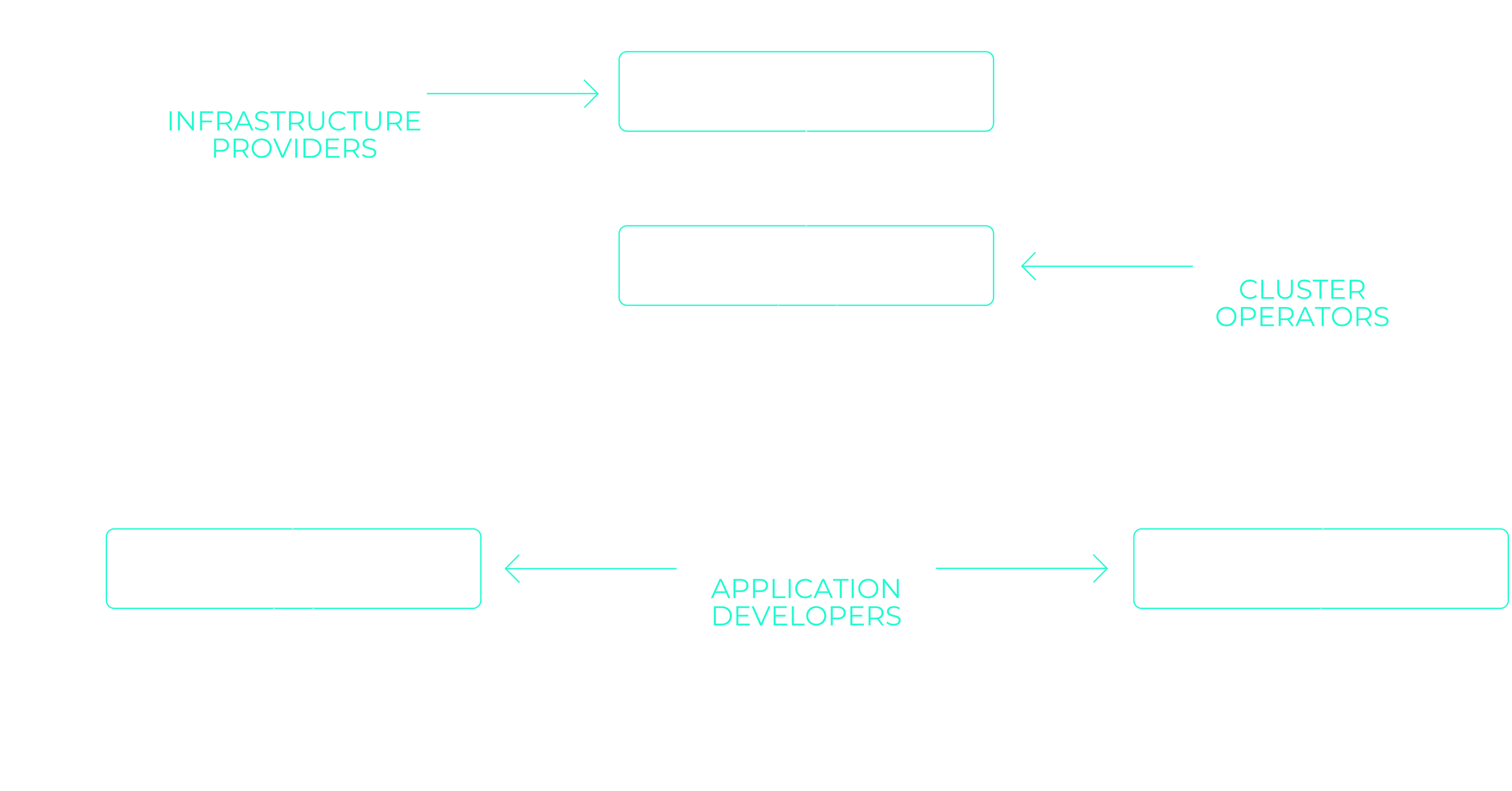
By and large, the Kubernetes Gateway API consists of three different classes of CustomResources: GatewayClasses, Gateways and xRoutes. As already mentioned, these are based on different role profiles:
- GatewayClasses define sets of gateways that have the same configuration and behavior. In this respect, they behave in the same way as IngressClasses of the Ingress API.
Each GatewayClass of the Gateway API is operated by a specific controller. A controller can handle several GatewayClasses , so it is a 1:n relationship. - Gateways define how network traffic is routed to services in the cluster.
The network traffic can originate from an external load balancer or another proxy in the cluster, for example. Gateways can either be created by users/operators of the cluster or by a gateway controller itself.
Gateways reference one or more xRoutes. - xRoutes include various route resources that are intended for different scenarios:
HTTPRoutes route to L7 based on the HTTP(S) specification. TLSRoutes can be used for encrypted network traffic where aspects of HTTP are not considered.
TCPRoutes and UDPRoutes map one or more ports to a backend, depending on the selected protocol. TLS can also be terminated here. GRPCRoutes are intended for handling and routing the gRPC protocol. The gateway used must support HTTP/2 for this.
A route can be assigned to one or more gateways. The relationship between gateways and xRoutes is therefore m:n.
The components in the role model
If you read through these descriptions, they can be assigned to different roles in an IT organization.
Providers of shared infrastructure could, for example, be responsible for the provision of gateway classes. This ensures that the configuration and selected controllers are compatible with the general network infrastructure (e.g. hardware/cloud load balancers).
Cluster administrators then provide specific gateways based on these gateway classes, which can be consumed by cluster users. The gateways can be restricted to individual namespaces or cluster tenants.
Last but not least, cluster users define the routes that implement the actual routing rules: They know best how the applications they operate or develop behave in the network.
After this theoretical discussion of the Kubernetes Gateway API, it’s high time to take a look at it in practice!
Testing the Gateway API with NGINX Gateway Fabric
For our experiment, we will deploy Podinfo in a cluster and make it available outside the cluster via the Gateway API.
Don’t have a cluster to hand right now? Test the Kubernetes Gateway API on a managed cluster from NETWAYS Web Services. Reliable, cost-effective and ready to go in minutes.
We use NGINX Gateway Fabric, an open source gateway controller similar to ingress-nginx, to implement the gateway API. The documentation contains instructions for testing the Gateway API locally in a KinD cluster .
Installation of the Gateway API CRDs and the Gateway Controller
First, the CustomResourceDefinitions of the Gateway API must be installed in the cluster:
kubectl kustomize "https://github.com/nginx/nginx-gateway-fabric/config/crd/gateway-api/standard?ref=v2.0.0" | kubectl apply -f -NGINX Gateway Fabric with Helm can then be installed:
helm install ngf oci://ghcr.io/nginx/charts/nginx-gateway-fabric --create-namespace -n nginx-gateway
kubectl get gatewayclassesThe NGINX GatewayController is installed here in the namespace nginx-gateway. The GatewayController has also already created a GatewayClass called nginx.
Configuration of the demo application
The demo application can now be deployed in the cluster. We define a deployment with 3 replicas and a service that makes the deployment available in the cluster:
kubectl create deployment podinfo --replicas 3 --image stefanprodan/podinfo:latest
kubectl expose deployment podinfo --port 9898 --target-port 9898 --selector=app=podinfo
kubectl port-forward services/podinfo 9898:9898The port forward allows us to test whether the service and the demo application work as expected. The application should now be available at http://localhost:9898.
Now it’s time to define the gateway and the HTTP route required to make the podinfo service available outside the cluster. To do this, copy the following Kubernetes manifests into a file gateway.yaml:
apiVersion: gateway.networking.k8s.io/v1
kind: Gateway
metadata:
  name: nginx-gateway
spec:
  gatewayClassName: nginx
  listeners:
  - name: http
    port: 80
    protocol: HTTP
    hostname: "podinfo.example.com"
---
apiVersion: gateway.networking.k8s.io/v1
kind: HTTPRoute
metadata:
  name: podinfo
spec:
  parentRefs:
  - name: nginx-gateway
    sectionName: http
  hostnames:
  - "podinfo.example.com"
  rules:
  - matches:
    - path:
        type: PathPrefix
        value: /
    backendRefs:
    - name: podinfo
port: 9898These resources define the following two API objects in our Kubernetes cluster:
- a gateway with a single listener
httpthat handles HTTP network traffic on port 80 for the host namepodinfo.example.com. - an HTTP route that references the defined gateway including listener, defines its own host name as
podinfo.example.com, and routes all traffic topodinfo.example.com/to the defined backendpodinfo:9898(our previously definedpodinfoservice).
The gateway.yaml file can now also be deployed to the cluster:
kubectl create -f gateway.yamlTesting the Gateway API
We can now check whether the gateway and the HTTP route have been successfully created – this also tells us the publicly accessible IP address that we need for the final test:
kubectl get gateways,httproutes
NAME                                              CLASS   ADDRESS         PROGRAMMED   AGE
gateway.gateway.networking.k8s.io/nginx-gateway   nginx   185.233.188.2   True         65m

NAME                                          HOSTNAMES                           AGE
httproute.gateway.networking.k8s.io/podinfo ["podinfo.example.com"] 61mWe can now use cURL to test whether our demo application can be reached from outside the cluster:
curl -H "Host: podinfo.example.com" http://185.233.188.2                                                                                                                  {
  "hostname": "podinfo-5d89c6b9cc-9tmtm",
  "version": "6.9.0",
  "revision": "fb3b01be30a3f353b221365cd3b4f9484a0885ea",
  "color": "#34577c",
  "logo": "https://raw.githubusercontent.com/stefanprodan/podinfo/gh-pages/cuddle_clap.gif",
  "message": "greetings from podinfo v6.9.0",
  "goos": "linux",
  "goarch": "amd64",
  "runtime": "go1.24.3",
  "num_goroutine": "6",
  "num_cpu": "4"
}The test is successful! With the help of the Gateway API, we have made our demo application available outside the cluster – completely without Ingress.
With an entry in /etc/hosts in the form 185.233.188.2 podinfo.example.com you can also call up the demo application in your browser at http://podinfo.example.com! For the entry, of course, use the IP that was displayed in the output of the previous command.
The Kubernetes Gateway API – a standard for the future?
The Gateway API marks an important step in the further development of network configuration on Kubernetes.
With its role-based design and focus on portability, expressiveness and extensibility, it addresses many weaknesses of the previous Ingress model. Both developers and platform operators were considered in the API specification.
The clearly separated roles and resources such as GatewayClass, Gateway and the various xRoute types allow for fine-grained control and better accountability within the team.
The practical example with NGINX Gateway Fabric and a Podinfo deployment has hopefully shown how quick it can be to get started, despite the extended possibilities.
At the same time, it is clear that the Gateway API can mean additional complexity for the same reasons, but also offers significantly more flexibility.
In addition, there are new, standardized ways of configuration that are not easily possible in the Ingress API, for example.
Anyone already using Kubernetes today should familiarize themselves with the Kubernetes Gateway API. It is not just an alternative for Ingress, but a modern foundation for more complex routing scenarios that is likely to become the dominant standard in the Kubernetes ecosystem in the medium term.
If you want to switch your Kubernetes clusters to the Gateway API today, you can easily do so in NETWAYS Managed Kubernetes. If you have any questions or problems, our MyEngineers® are also available to help you.




0 Comments