


What is two-factor authentication (2FA)?
Two-factor authentication (2FA) increases the security of your Nextcloud account by requiring both your password and a second verification method. This second factor usually comes from an app such as Google Authenticator or TOTP Authenticator, which generates a code that is updated every 30 seconds. Without this code, no one can access your account, even with your password.
In this article, you will learn how to set up 2FA on Nextcloud with a TOTP app (Time-based One-Time Password). Follow these simple steps to install the app and enable two-factor authentication.
Steps to enable two-factor authentication in Nextcloud
To enable 2FA in Nextcloud, you need to install an app that offers TOTP functionality. This is how it works:
1. install the two-factor TOTP provider app
Open the Deactivated apps section. First log in to your Nextcloud account. Go to the Disabled apps section to view available add-ons that can extend the functionality of Nextcloud.
2. open the “Deactivated apps” section.
Search for the Two-Factor TOTP Provider app. Click here to install and activate it so that it can be used for 2FA.

3. go to the profile settings
After activation, navigate to your profile settings by selecting your user name in the top right-hand corner and then selecting Personal settings.
4. activate TOTP in the security settings
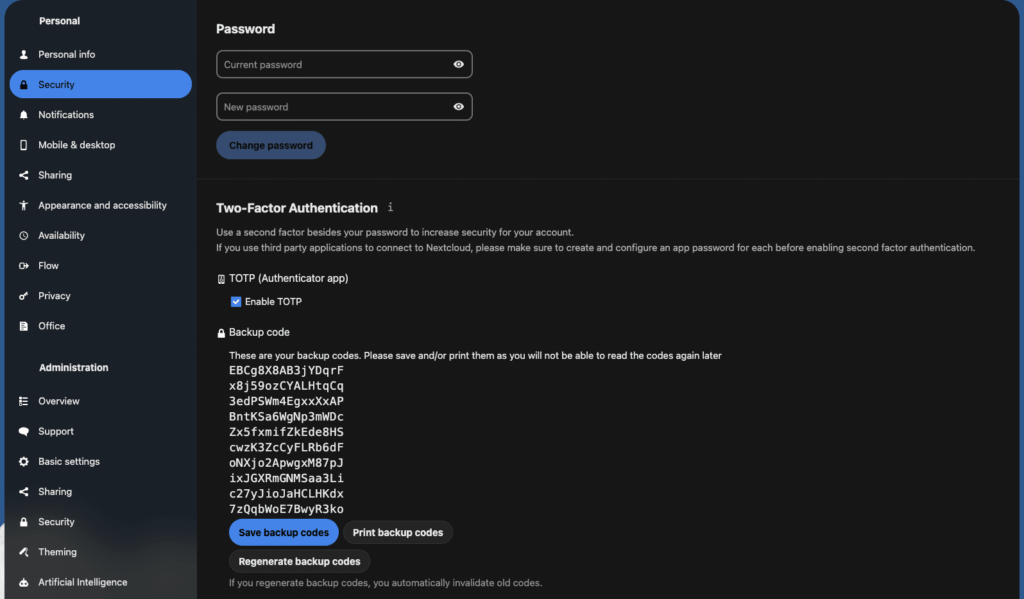
Activate the Enable TOTP option in the Security section. This will start the setup process for your TOTP authentication.
5. scan the QR code or enter the TOTP secret
A QR code will be displayed. Use a TOTP app like Google Authenticator on your phone to scan it or enter the TOTP secret manually. This will connect your Nextcloud account to the authentication app.
6. check the setup
After linking, your TOTP app generates unique passcodes. Enter the current code displayed in the app to check the setup.
7. generate backup codes
Create backup codes after verification and keep them in a safe place. You can use these codes to access your account if you lose access to your phone or authentication app.
Testing your 2FA setup
This is how you ensure that 2FA works properly:
- Log out of Nextcloud.
- Log in again with your user name and password.
- Enter the TOTP code that is displayed in your authentication app.
If this is successful, 2FA will be set up correctly. Congratulations! Your Nextcloud account now has an additional layer of security.

Conclusion
When two-factor authentication is enabled, your Nextcloud account is more secure against unauthorized access. Enjoy the added peace of mind that your data is better protected!




0 Comments