

As of this week, our customers can use the “Nodegroup feature” for their NWS Managed Kubernetes clusters. What are nodegroups and what can I do with them? Our seventh tutorial in the series explains this and more.
What are node groups?
Nodegroups make it possible to create multiple Kubernetes node groups and manage them independently of each other. A node group describes a number of virtual machines that have various attributes as a group. Essentially, this determines which flavor – i.e. which VM model – is to be used within this group. However, other attributes can also be selected. Each nodegroup can be scaled vertically at any time, independently of the others.
Why Nodegroups?
Node groups are suitable for running pods specifically on certain nodes. For example, it is possible to define a group with the “availability zone” attribute. In addition to the existing “default-nodegroup”, which distributes the nodes relatively randomly across all availability zones, further nodegroups can be created, each of which is only explicitly started in one availability zone. Within the Kubernetes cluster, you can divide your pods into the corresponding availability zones or node groups. Another possible scenario is to divide your node groups into fast and slower VMs. Services and applications that do not have any special requirements can be assigned to the slower and therefore usually cheaper node group, while pods with more requirements are operated exclusively on fast nodes. This flexibility allows you to use your own imagination and meet your own requirements. New nodegroups can be easily created via the NWS web interface:
Show existing node groups
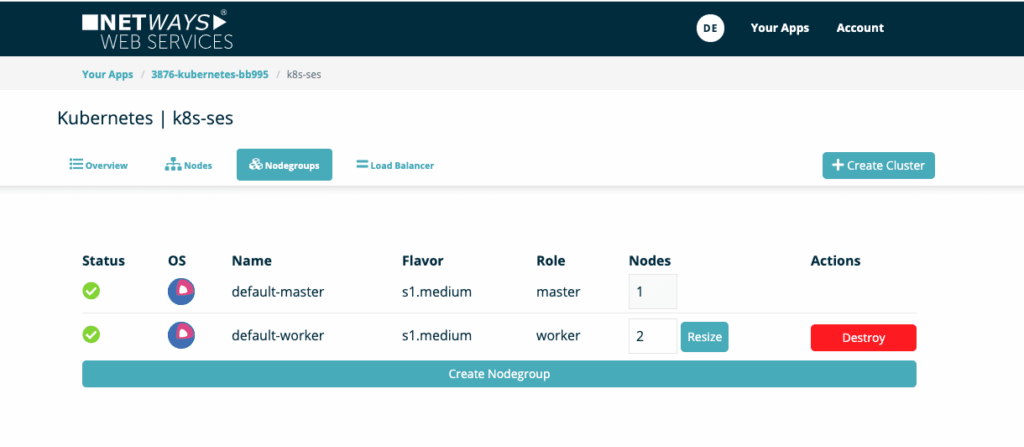
The first image shows our exemplary Kubernetes cluster “k8s-ses”. This currently has two node groups: “default-master” and “default-worker”.
Create new nodegroup
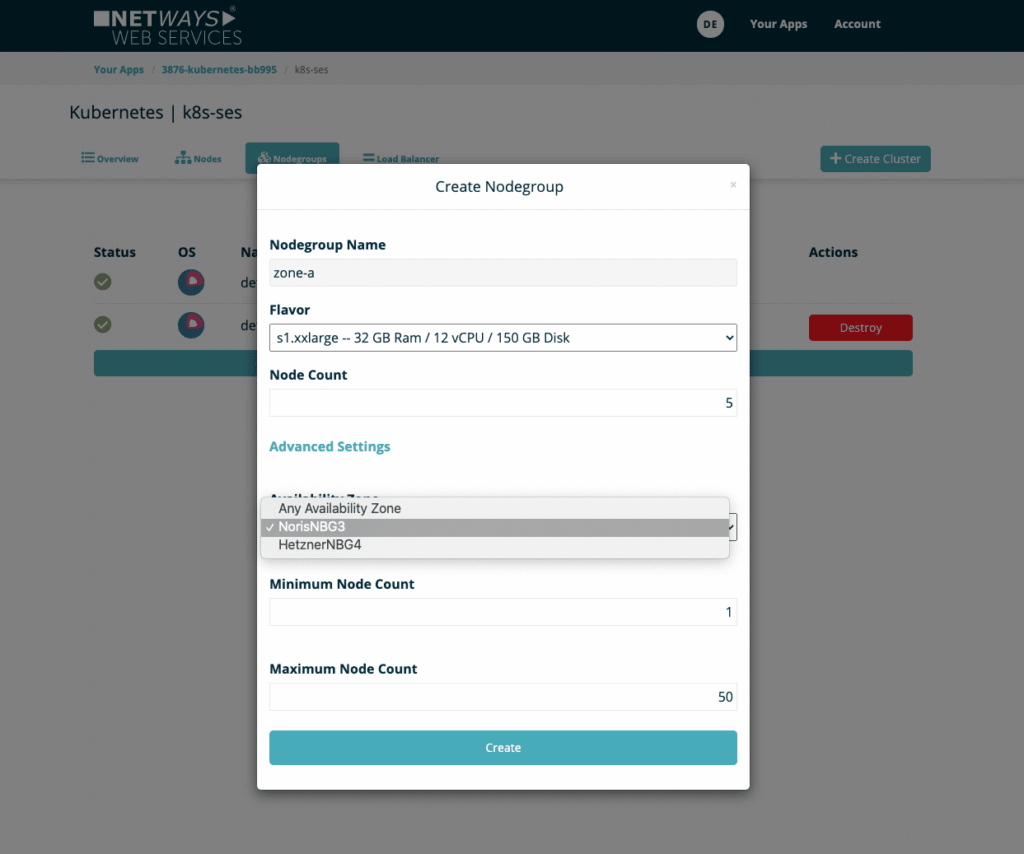
A new nodegroup can be created via the “Create Nodegroup” dialog with the following options:
- Name: Name of the nodegroup, which can later be used as a label for K8s
- Flavor: Size of the virtual machines used
- Node Count: Number of initial nodes, can be increased and decreased at any time later.
- Availability Zone: a specific availability zone
- Minimum Node Count: The node group must not contain fewer nodes than the defined value.
- Maximium Node Count: The node group cannot grow to more than the specified number of nodes.
The last two options are particularly important for AutoScaling and therefore limit the automatic mechanism.

You will then see the new node group in the overview. Provisioning the nodes only takes a few minutes. The number of each group can also be individually changed or removed at any time.
Using node groups in the Kubernetes cluster
Within the Kubernetes cluster, you can see your new nodes after they have been provisioned and are ready for use.
kubectl get nodes -L magnum.openstack.org/role
NAME                                 STATUS   ROLES    AGE   VERSION   ROLE
k8s-ses-6osreqalftvz-master-0        Ready    master   23h   v1.18.2   master
k8s-ses-6osreqalftvz-node-0          Ready    <none>   23h   v1.18.2   worker
k8s-ses-6osreqalftvz-node-1          Ready    <none>   23h   v1.18.2   worker
k8s-ses-zone-a-vrzkdalqjcud-node-0   Ready    <none>   31s   v1.18.2   zone-a
k8s-ses-zone-a-vrzkdalqjcud-node-1   Ready    <none>   31s   v1.18.2   zone-a
k8s-ses-zone-a-vrzkdalqjcud-node-2   Ready    <none>   31s   v1.18.2   zone-a
k8s-ses-zone-a-vrzkdalqjcud-node-3   Ready    <none>   31s   v1.18.2   zone-a
k8s-ses-zone-a-vrzkdalqjcud-node-4 Ready <none> 31s v1.18.2 zone-aThe node labels magnum.openstack.org/nodegroup and magnum.openstack.org/role bear the name of the node group for nodes that belong to the group. There is also the label topology.kubernetes.io/zone, which bears the name of the availability zone. Deployments or pods can be assigned to the nodes or groups with the help of nodeSelectors:
nodeSelector:
magnum.openstack.org/role: zone-aWould you like to see for yourself that Managed Kubernetes at NWS is so easy? Then try it out now.




0 Comments