

Monitoring – a certain love-hate relationship for many. Some like it, others demonize it. I’m one of those who usually demonize it, but then complain if you can’t see certain metrics and information. Regardless of personal preferences on this topic, the consensus is clear: monitoring is important and a setup is only as good as its associated monitoring. If you want to develop and operate your applications on the basis of Kubernetes, sooner or later you will inevitably ask yourself how you can monitor these applications and the Kubernetes cluster. One option is to use the Prometheus monitoring solution; more precisely, by using the Kubernetes Prometheus Operator. An exemplary and functional solution is shown in this tutorial.
Kubernetes Operator
Kubernetes Operators are briefly explained extensions that can be used to create your own resource types. In addition to the standard Kubernetes resources such as Pods, DaemonSets, Services etc., you can also use your own resources with the help of an operator. In our example, the following are new additions: Prometheus, ServiceMonitor and others. Operators are very useful if you need to perform special manual tasks for your application in order to run it properly. This could be database schema updates for version updates, special backup jobs or controlling events in distributed systems, for example. As a rule, operators – like normal applications – run as containers within the cluster.
How does it work?
The basic idea is that one or many Prometheus instances are started with the Prometheus Operator, which in turn are dynamically configured by the ServiceMonitor. This means that a ServiceMonitor can be docked to a standard Kubernetes service, which in turn can also read the endpoints and configure the associated Prometheus instance accordingly. If the service or the endpoints change, for example in number or the endpoints have new IPs, the ServiceMonitor recognizes this and reconfigures the Prometheus instance each time. Manual configuration can also be carried out using configmaps.
Prerequisites
The prerequisite is a functioning Kubernetes cluster. For the following example, I am using an NWS Managed Kubernetes Cluster in version 1.16.2.
Installation Prometheus Operator
First, the Prometheus operator is provided. A deployment, a required ClusterRole with associated ClusterRoleBinding and a ServiceAccount are defined.
apiVersion: rbac.authorization.k8s.io/v1
kind: ClusterRoleBinding
metadata:
  labels:
    app.kubernetes.io/component: controller
    app.kubernetes.io/name: prometheus-operator
    app.kubernetes.io/version: v0.38.0
  name: prometheus-operator
roleRef:
  apiGroup: rbac.authorization.k8s.io
  kind: ClusterRole
  name: prometheus-operator
subjects:
- kind: ServiceAccount
  name: prometheus-operator
  namespace: default
---
apiVersion: rbac.authorization.k8s.io/v1
kind: ClusterRole
metadata:
  labels:
    app.kubernetes.io/component: controller
    app.kubernetes.io/name: prometheus-operator
    app.kubernetes.io/version: v0.38.0
  name: prometheus-operator
rules:
- apiGroups:
  - apiextensions.k8s.io
  resources:
  - customresourcedefinitions
  verbs:
  - create
- apiGroups:
  - apiextensions.k8s.io
  resourceNames:
  - alertmanagers.monitoring.coreos.com
  - podmonitors.monitoring.coreos.com
  - prometheuses.monitoring.coreos.com
  - prometheusrules.monitoring.coreos.com
  - servicemonitors.monitoring.coreos.com
  - thanosrulers.monitoring.coreos.com
  resources:
  - customresourcedefinitions
  verbs:
  - get
  - update
- apiGroups:
  - monitoring.coreos.com
  resources:
  - alertmanagers
  - alertmanagers/finalizers
  - prometheuses
  - prometheuses/finalizers
  - thanosrulers
  - thanosrulers/finalizers
  - servicemonitors
  - podmonitors
  - prometheusrules
  verbs:
  - '*'
- apiGroups:
  - apps
  resources:
  - statefulsets
  verbs:
  - '*'
- apiGroups:
  - ""
  resources:
  - configmaps
  - secrets
  verbs:
  - '*'
- apiGroups:
  - ""
  resources:
  - pods
  verbs:
  - list
  - delete
- apiGroups:
  - ""
  resources:
  - services
  - services/finalizers
  - endpoints
  verbs:
  - get
  - create
  - update
  - delete
- apiGroups:
  - ""
  resources:
  - nodes
  verbs:
  - list
  - watch
- apiGroups:
  - ""
  resources:
  - namespaces
  verbs:
  - get
  - list
  - watch
---
apiVersion: apps/v1
kind: Deployment
metadata:
  labels:
    app.kubernetes.io/component: controller
    app.kubernetes.io/name: prometheus-operator
    app.kubernetes.io/version: v0.38.0
  name: prometheus-operator
  namespace: default
spec:
  replicas: 1
  selector:
    matchLabels:
      app.kubernetes.io/component: controller
      app.kubernetes.io/name: prometheus-operator
  template:
    metadata:
      labels:
        app.kubernetes.io/component: controller
        app.kubernetes.io/name: prometheus-operator
        app.kubernetes.io/version: v0.38.0
    spec:
      containers:
      - args:
        - --kubelet-service=kube-system/kubelet
        - --logtostderr=true
        - --config-reloader-image=jimmidyson/configmap-reload:v0.3.0
        - --prometheus-config-reloader=quay.io/coreos/prometheus-config-reloader:v0.38.0
        image: quay.io/coreos/prometheus-operator:v0.38.0
        name: prometheus-operator
        ports:
        - containerPort: 8080
          name: http
        resources:
          limits:
            cpu: 200m
            memory: 200Mi
          requests:
            cpu: 100m
            memory: 100Mi
        securityContext:
          allowPrivilegeEscalation: false
      nodeSelector:
        beta.kubernetes.io/os: linux
      securityContext:
        runAsNonRoot: true
        runAsUser: 65534
      serviceAccountName: prometheus-operator
---
apiVersion: v1
kind: ServiceAccount
metadata:
  labels:
    app.kubernetes.io/component: controller
    app.kubernetes.io/name: prometheus-operator
    app.kubernetes.io/version: v0.38.0
  name: prometheus-operator
  namespace: default
---
apiVersion: v1
kind: Service
metadata:
  labels:
    app.kubernetes.io/component: controller
    app.kubernetes.io/name: prometheus-operator
    app.kubernetes.io/version: v0.38.0
  name: prometheus-operator
  namespace: default
spec:
  clusterIP: None
  ports:
  - name: http
    port: 8080
    targetPort: http
  selector:
    app.kubernetes.io/component: controller
app.kubernetes.io/name: prometheus-operatorkubectl apply -f 00-prometheus-operator.yaml
clusterrolebinding.rbac.authorization.k8s.io/prometheus-operator created
clusterrole.rbac.authorization.k8s.io/prometheus-operator created
deployment.apps/prometheus-operator created
serviceaccount/prometheus-operator created
service/prometheus-operator createdRole Based Access Control
Corresponding Role Based Access Control (RBAC) policies are also required. The Prometheus instances (StatefulSets), started by the Prometheus operator, start containers under the “Prometheus” service account of the same name. This account requires read access to the Kubernetes API in order to be able to read the information about services and endpoints later.
Cluster role
apiVersion: rbac.authorization.k8s.io/v1beta1
kind: ClusterRole
metadata:
  name: prometheus
rules:
- apiGroups: [""]
  resources:
  - nodes
  - services
  - endpoints
  - pods
  verbs: ["get", "list", "watch"]
- apiGroups: [""]
  resources:
  - configmaps
  verbs: ["get"]
- nonResourceURLs: ["/metrics"]
verbs: ["get"]kubectl apply -f 01-clusterrole.yaml
clusterrole.rbac.authorization.k8s.io/prometheus createdClusterRoleBinding
apiVersion: rbac.authorization.k8s.io/v1beta1
kind: ClusterRoleBinding
metadata:
  name: prometheus
roleRef:
  apiGroup: rbac.authorization.k8s.io
  kind: ClusterRole
  name: prometheus
subjects:
- kind: ServiceAccount
  name: prometheus
namespace: defaultkubectl apply -f 01-clusterrolebinding.yaml
clusterrolebinding.rbac.authorization.k8s.io/prometheus createdServiceAccount
apiVersion: v1
kind: ServiceAccount
metadata:
name: prometheuskubectl apply -f 01-serviceaccount.yaml
serviceaccount/prometheus createdMonitoring of Kubernetes cluster nodes
There are various metrics that can be read from a Kubernetes cluster. In this example, we will initially only look at the system values of the Kubernetes nodes. The “Node Exporter” software, which is also provided by the Prometheus project, can be used to monitor the Kubernetes cluster nodes. This reads out all metrics about CPU, memory and I/O and makes these values available for retrieval under /metrics. Prometheus itself “crawls” these metrics later at regular intervals. A DaemonSet controls that one container/pod is started on each Kubernetes node. The service is used to group all endpoints under one cluster IP.
apiVersion: apps/v1
kind: DaemonSet
metadata:
  name: node-exporter
spec:
  selector:
    matchLabels:
      app: node-exporter
  template:
    metadata:
      labels:
        app: node-exporter
      name: node-exporter
    spec:
      hostNetwork: true
      hostPID: true
      containers:
      - image: quay.io/prometheus/node-exporter:v0.18.1
        name: node-exporter
        ports:
        - containerPort: 9100
          hostPort: 9100
          name: scrape
        resources:
          requests:
            memory: 30Mi
            cpu: 100m
          limits:
            memory: 50Mi
            cpu: 200m
        volumeMounts:
        - name: proc
          readOnly:  true
          mountPath: /host/proc
        - name: sys
          readOnly: true
          mountPath: /host/sys
      volumes:
      - name: proc
        hostPath:
          path: /proc
      - name: sys
        hostPath:
          path: /sys
---
apiVersion: v1
kind: Service
metadata:
  labels:
    app: node-exporter
  annotations:
    prometheus.io/scrape: 'true'
  name: node-exporter
spec:
  ports:
  - name: metrics
    port: 9100
    protocol: TCP
  selector:
app: node-exporterkubectl apply -f 02-exporters.yaml
daemonset.apps/node-exporter created
service/node-exporter createdService Monitor
With the so-called third party resource “ServiceMonitor”, provided by the Prometheus operator, it is possible to include the previously started service, in our case node-exporter, for future monitoring. The TPR itself receives a label team: frontend, which in turn is later used as a selector for the Prometheus instance.
apiVersion: monitoring.coreos.com/v1
kind: ServiceMonitor
metadata:
  name: node-exporter
  labels:
    team: frontend
spec:
  selector:
    matchLabels:
      app: node-exporter
  endpoints:
- port: metricskubectl apply -f 03-service-monitor-node-exporter.yaml
servicemonitor.monitoring.coreos.com/node-exporter createdPrometheus instance
A Prometheus instance is defined, which now collects all services based on the labels and obtains the metrics from their endpoints.
apiVersion: monitoring.coreos.com/v1
kind: Prometheus
metadata:
  name: prometheus
spec:
  serviceAccountName: prometheus
  serviceMonitorSelector:
    matchLabels:
      team: frontend
  resources:
    requests:
      memory: 400Mi
enableAdminAPI: falsekubectl apply -f 04-prometheus-service-monitor-selector.yaml
prometheus.monitoring.coreos.com/prometheus createdPrometheus Service
The started Prometheus instance is exposed with a service object. After a short wait, a cloud load balancer is started, which is accessible from the Internet and passes requests through to our Prometheus instance.
apiVersion: v1
kind: Service
metadata:
  name: prometheus
spec:
  type: LoadBalancer
  ports:
  - name: web
    port: 9090
    protocol: TCP
    targetPort: web
  selector:
prometheus: prometheuskubectl apply -f 05-prometheus-service.yaml
service/prometheus created
kubectl get services
NAME TYPE CLUSTER-IP EXTERNAL-IP PORT(S) AGE
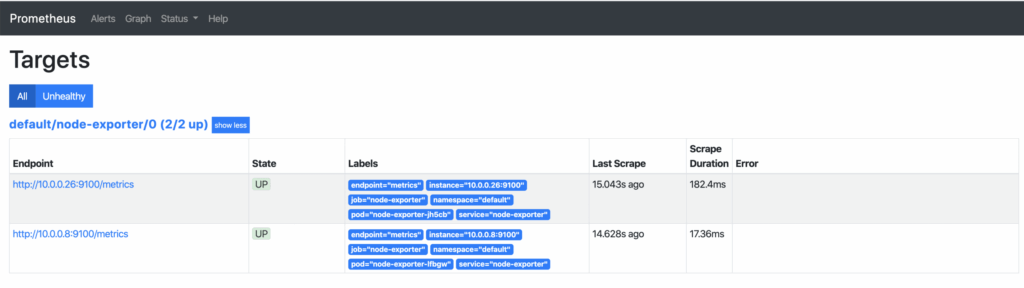
prometheus LoadBalancer 10.254.146.112 pending 9090:30214/TCP 58sAs soon as the external IP address is available, it can be accessed via http://x.x.x.x:9090/targets and you can see all your Kubernetes nodes, whose metrics are now retrieved regularly. If additional nodes are added later, they are automatically included or removed again.
Visualization with Grafana
The collected metrics can be easily and attractively visualized with Grafana. Grafana is an analysis tool that supports various data backends.
apiVersion: v1
kind: Service
metadata:
  name: grafana
spec:
#  type: LoadBalancer
  ports:
  - port: 3000
    targetPort: 3000
  selector:
    app: grafana
---
apiVersion: apps/v1
kind: Deployment
metadata:
  labels:
    app: grafana
  name: grafana
spec:
  selector:
    matchLabels:
      app: grafana
  replicas: 1
  revisionHistoryLimit: 2
  template:
    metadata:
      labels:
        app: grafana
    spec:
      containers:
      - image: grafana/grafana:latest
        name: grafana
        imagePullPolicy: Always
        ports:
        - containerPort: 3000
        env:
          - name: GF_AUTH_BASIC_ENABLED
            value: "false"
          - name: GF_AUTH_ANONYMOUS_ENABLED
            value: "true"
          - name: GF_AUTH_ANONYMOUS_ORG_ROLE
            value: Admin
          - name: GF_SERVER_ROOT_URL
value: /api/v1/namespaces/default/services/grafana/proxy/kubectl apply -f grafana.yaml
service/grafana created
deployment.apps/grafana created
kubectl proxy
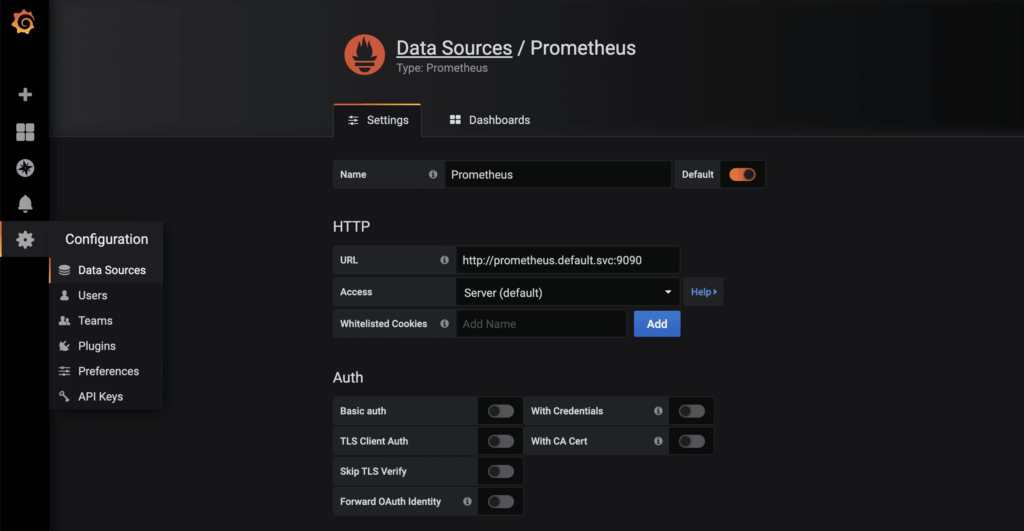
Starting to serve on 127.0.0.1:8001As soon as the proxy connection is available through kubectl, the started Grafana instance can be called up in the browser via http://localhost:8001/api/v1/namespaces/default/services/grafana/proxy/. Only a few more steps are required to display the metrics available in Prometheus in a visually appealing way. First, a new data source of the Prometheus type is created. Thanks to Kubernetes’ own and internal DNS, the URL is http://prometheus.default.svc:9090. The schema is servicename.namespace.svc. Alternatively, the cluster IP can of course also be used.
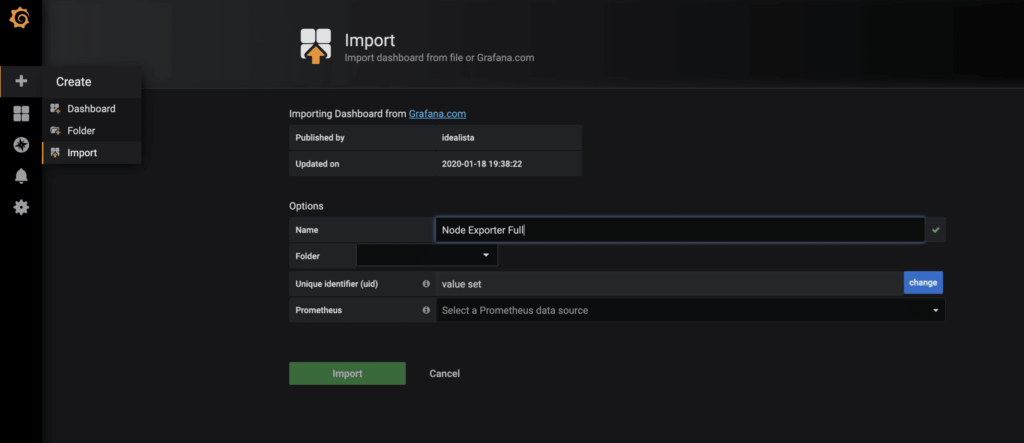
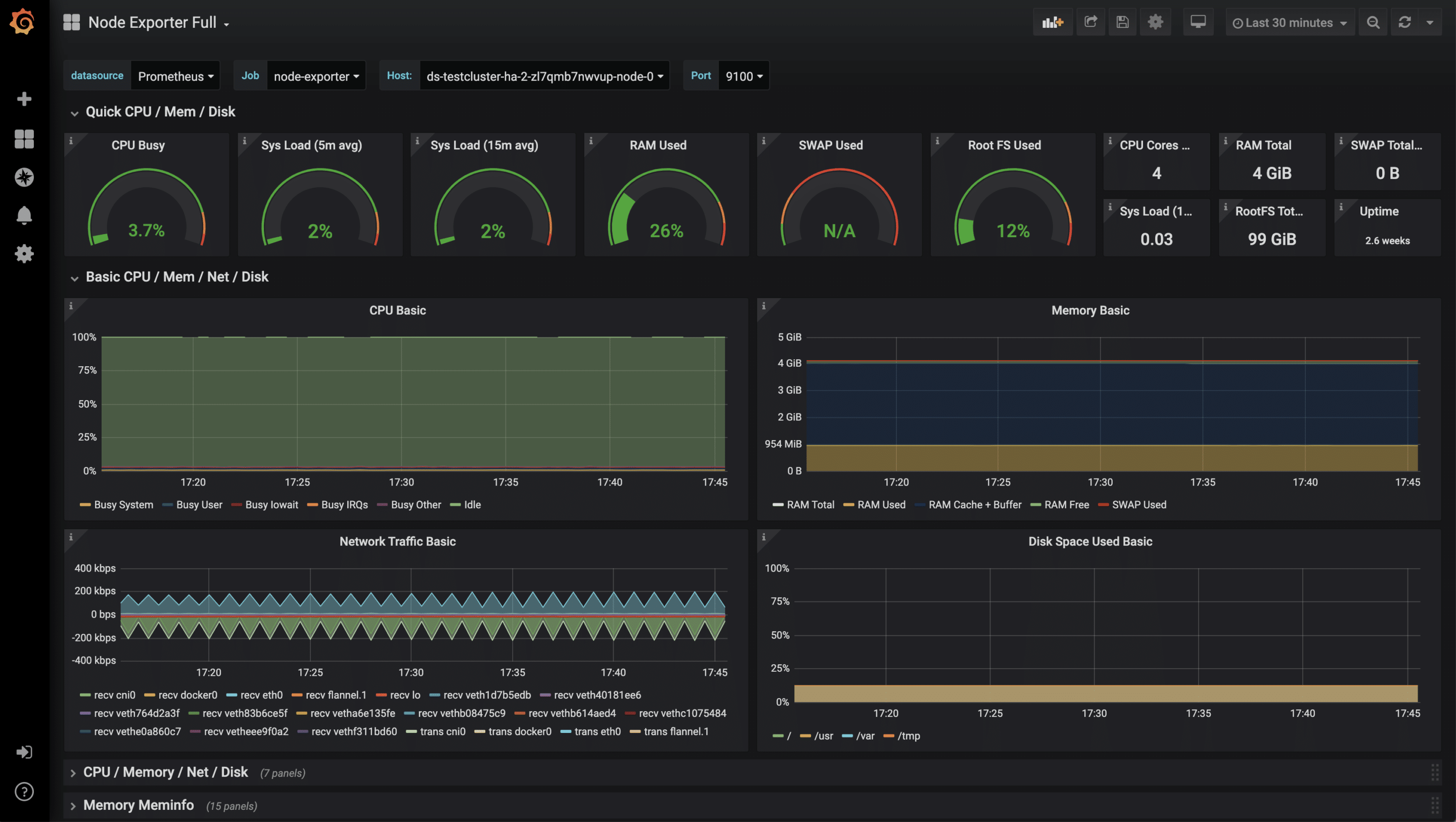
There is already a very complete Grafana dashboard for the collected metrics of the node-exporter, which can be imported using the import function. The ID of the dashboard is 1860.
Once the dashboard has been successfully imported, the metrics can now be examined.
Monitoring of other applications
In addition to these more technical statistics, other metrics of your own applications are also possible, such as HTTP requests, SQL queries, business logic and much more. The very flexible data format means that there are virtually no limits here. As always, there are several approaches to collecting your own metrics. One of them is to equip your application with a /metrics endpoint. Some frameworks such as Ruby on Rails already have useful extensions. Another approach is so-called sidecars. A sidecar is an additional container that runs alongside the actual application container. Both together form a pod that shares namespace, network, etc. The sidecar then runs code that checks the application and makes the results available to Prometheus as parseable values. Essentially, both approaches can be linked to the Prometheus operator, as shown in the example above.




0 Comments